Blog / Daphne Volkswagen Service

How to Jumpstart Your Volkswagen: A Step by Step Guide

jumpstartvolk

How to Jumpstart a Volkswagen Safely Near Daphne, AL

A dead 12-volt battery can interrupt your day fast, but a Volkswagen jumpstart should never be rushed. The safest process starts with checking the battery condition, confirming the correct jump points, turning off electrical loads, connecting the jumper cables in the proper order, and using an approved ground point instead of guessing near battery sensors or wiring.

Volkswagen of Daphne created this guide for drivers in Daphne, Fairhope, Spanish Fort, Mobile, Foley, and Gulf Shores who need clear steps for jumpstarting a VW Jetta, Tiguan, Taos, Atlas, Golf, or another Volkswagen model. Use this guide to understand when it is safe to jumpstart, when to call Volkswagen Roadside Assistance, and when a dead battery means it is time to schedule Volkswagen battery service.

Last updated: July 8, 2026

A Volkswagen jumpstart uses a booster pack or another vehicle’s 12-volt battery to provide temporary power to a VW with a discharged 12-volt battery. On modern Volkswagen models, safe jumpstarting depends on correct cable order, approved jump points, battery condition, and extra caution around Stop-Start systems, battery monitoring, and sensitive electronics.

Quick Answer: How Do You Jumpstart a Volkswagen?

To jumpstart a Volkswagen, park safely, turn off both vehicles and electrical loads, connect the red cable to the disabled VW’s positive terminal or approved positive jump post, connect the other red cable to the assisting battery, connect the black cable to the assisting battery’s negative terminal, then connect the final black clamp to the approved ground point on the disabled VW. Start the assisting vehicle or booster pack, start the Volkswagen, then remove the cables in reverse order.

  • Do not jumpstart: If the battery is leaking, cracked, frozen, swollen, smoking, sparking, heavily corroded, or smells like sulfur.
  • Best first step: Check the owner’s manual for your exact Volkswagen model and year.
  • Most common mistake: Guessing the negative connection point or clamping near battery sensor wiring.
  • After the jumpstart: Schedule battery testing if the battery died more than once, the vehicle cranks slowly, or warning messages appear.

Safety Warning: Read This Before Connecting Jumper Cables

Safety Warning: Do not jumpstart your Volkswagen if the battery is cracked, leaking, frozen, swollen, smoking, sparking, heavily corroded, or smells like rotten eggs. Do not jumpstart a vehicle that was recently flooded, has damaged cables, or shows warning messages that suggest a serious electrical fault.

If you cannot identify the correct positive terminal, remote positive jump post, or approved ground point, stop and request help. Always follow the owner’s manual for your exact Volkswagen model and year.

A dead battery can feel urgent, especially in a hot Daphne parking lot, during a Mobile commute, or before a family drive to Gulf Shores. Still, incorrect jumper-cable placement can damage electronics, cause sparks, or create safety hazards around the battery. The safest first step is not connecting cables. It is deciding whether the battery and location are safe enough to attempt a jumpstart.

SituationRiskRecommended ActionWhy It Matters
Battery is leaking, cracked, swollen, frozen, or smells like sulfurPossible chemical, gas, or explosion riskDo not jumpstartBattery damage can create a serious safety hazard
You cannot identify the correct jump pointsIncorrect connectionCheck owner resources or request helpModern VW electrical systems need correct connection points
Vehicle is on a highway shoulder or unsafe roadsideTraffic injury riskCall roadside assistanceYour safety comes before the jumpstart
Cables or clamps are damagedSparks, heat, or poor connectionDo not use those cablesDamaged cables can arc, overheat, or fail
Battery has died more than onceWeak battery, charging issue, or electrical drawSchedule battery testingA jumpstart does not solve the root problem

Use Volkswagen Roadside Assistance

Before You Jumpstart Your Volkswagen

Key Takeaway: Before you connect cables, confirm the battery is safe, identify the correct positive and ground points, turn off electrical loads, and check the owner’s manual for your specific Volkswagen.
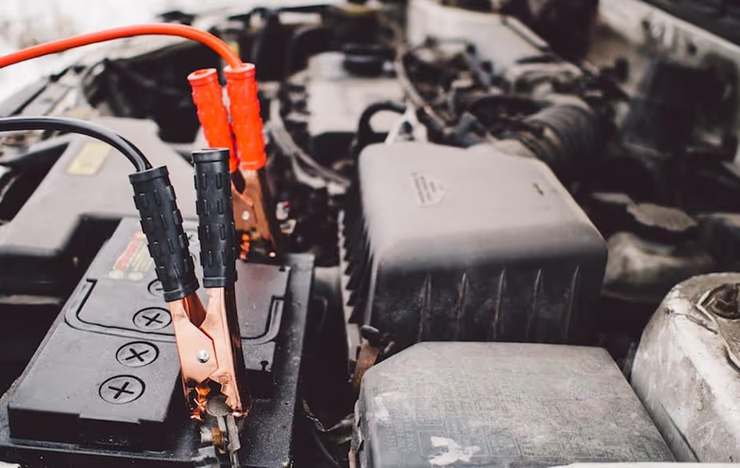
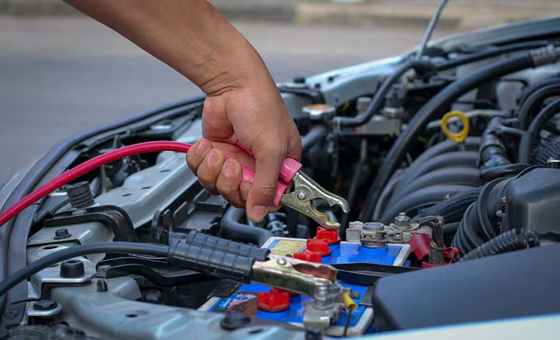
Volkswagen jumpstart safety guide for connecting jumper cables near Daphne AL

Volkswagen jump point locations can vary by model, engine layout, battery location, and equipment. Some VW models use battery terminals directly, while others may have a remote positive jump post or a specific approved ground point under the hood. That is why we recommend checking the owner’s manual or digital owner resources before connecting anything.

Before you begin, turn off headlights, climate control, heated seats, interior lights, chargers, audio, and other electrical loads. Make sure both vehicles are in Park, the parking brakes are set, and the vehicles are not touching. If you are using a portable booster pack, read the booster pack instructions before connecting it to the VW.

Check Battery Condition

Do not proceed if the battery looks damaged, swollen, frozen, leaking, or heavily corroded.

Confirm Jump Points

Find the approved positive point and approved ground point for your exact VW model.

Turn Loads Off

Turn off lights, climate control, seat heaters, chargers, and accessories before connecting cables.

What to Know About Stop-Start and Battery Sensors

Many modern Volkswagen vehicles use battery monitoring and may include Stop-Start systems. These systems can rely on battery condition data, charging behavior, and electrical sensors. Do not clamp onto sensor wiring, bypass battery sensors, or assume the negative battery post is always the preferred final connection point. Use the approved ground point listed in your owner resources.

Volkswagen or SituationWhat to Check FirstWhy It MattersRecommended Action
Jetta, Taos, Tiguan, Atlas, GolfOwner’s manual jumpstart sectionJump points may vary by model and yearUse manual-specific instructions
Stop-Start equipped VWBattery sensor and approved ground pointIncorrect grounding can affect battery monitoringUse the approved ground point, not sensor wiring
Remote positive jump post presentPost location and cap markingSome models provide a dedicated positive pointConnect the red clamp only after confirming location
Unclear negative connectionApproved body or engine groundReduces spark risk near the batteryUse owner resources or call for help
Repeated no-start conditionBattery age, charging system, and possible drawA jumpstart may be temporarySchedule Volkswagen battery testing

Schedule VW Battery Service

Step-by-Step Volkswagen Jumpstart Instructions

Key Takeaway: The safest basic cable order is positive to the disabled VW, positive to the assisting battery, negative to the assisting battery, then negative to the approved ground point on the disabled VW.

These steps are a general guide for many gasoline Volkswagen vehicles with a discharged 12-volt battery. Always follow your owner’s manual first. If your model-specific instructions are different, follow the manual.

  1. Park safely. Put both vehicles in Park, set the parking brakes, and make sure the vehicles are not touching.
  2. Turn everything off. Turn off headlights, climate control, heated seats, chargers, radio, and other electrical loads.
  3. Open the hood and locate the jump points. Find the positive terminal or approved positive jump post on your Volkswagen and the approved ground point for the negative clamp.
  4. Connect the red clamp to the disabled VW. Attach one red positive clamp to the positive terminal or approved positive jump post on the Volkswagen with the dead battery.
  5. Connect the other red clamp to the assisting power source. Attach it to the positive terminal of the good battery or the positive terminal on the booster pack.
  6. Connect the black clamp to the assisting power source. Attach one black negative clamp to the negative terminal of the good battery or booster pack.
  7. Connect the final black clamp to the disabled VW ground point. Use the approved unpainted metal ground point listed in the owner’s manual. Avoid clamping to sensor wiring or a questionable painted surface.
  8. Start the assisting vehicle or activate the booster pack. Let the assisting vehicle run briefly, or turn on the booster pack according to its instructions.
  9. Start the Volkswagen. Try to start the VW. If it does not start after a few attempts, stop and request professional help.
  10. Remove cables in reverse order. Remove the black clamp from the VW ground point, black clamp from the assisting battery, red clamp from the assisting battery, then red clamp from the VW.
StepCable or ActionWhere It GoesImportant Note
1Red positive clampDisabled VW positive terminal or approved positive jump postConfirm the correct positive point first
2Other red positive clampAssisting battery or booster pack positive terminalKeep clamps separated
3Black negative clampAssisting battery or booster pack negative terminalFollow booster pack instructions if using one
4Final black negative clampApproved ground point on disabled VWAvoid battery sensor wiring and questionable surfaces
5Start and removeStart VW, then remove cables in reverse orderStop if sparks, smoke, or abnormal behavior appears

Do not let cable clamps touch each other while connected. Do not lean over the battery. Do not rev the assisting vehicle aggressively. Do not keep trying if the Volkswagen will not start, cranks oddly, shows electrical faults, or sparks occur.

Book a Battery Inspection

What to Do After Your Volkswagen Starts

Key Takeaway: A jumpstart provides temporary power. It does not prove the battery is healthy or that the charging system is working correctly.

After your Volkswagen starts, keep it running long enough to stabilize, then drive carefully only if the vehicle behaves normally. Do not assume the issue is solved. If the battery is weak, old, or unable to hold a charge, the vehicle may fail to restart after you shut it off.

We recommend scheduling a battery test after any jumpstart, especially if the battery has died more than once, the vehicle starts slowly, the Stop-Start system is unavailable, or warning messages appear. Modern VW battery testing can check battery condition, charging performance, terminal condition, and whether replacement is needed.

After-Start SymptomPossible MeaningWhat We RecommendService Priority
VW starts but cranks slowly again laterWeak battery or charging issueSchedule battery testingHigh
Stop-Start unavailableBattery charge or system condition concernBattery and system checkMedium to high
Battery warning light appearsCharging-system concernDo not ignore itHigh
Warning messages after jumpstartElectrical system needs reviewHave the vehicle inspectedHigh
Vehicle will not restart after being shut offBattery may not hold chargeBattery diagnostic and possible replacementHigh

Common Volkswagen Jumpstart Mistakes to Avoid

Key Takeaway: The biggest VW jumpstart mistakes are guessing the jump points, connecting the negative clamp incorrectly, ignoring battery damage, using damaged cables, and assuming the battery is fine after one successful restart.

A jumpstart is simple only when the battery is safe, the location is safe, and the connection points are clear. Many problems happen because someone tries to move too quickly. On a modern Volkswagen, the safest approach is to protect the driver, the battery, and the vehicle electronics before trying to save a few minutes.

MistakeWhy It Is a ProblemSafer AlternativeWho This Matters For
Connecting cables without checking owner resourcesJump points may vary by modelUse the VW digital owner’s manual by VINJetta, Taos, Tiguan, Atlas, and Golf owners
Clamping to sensor wiring near the batteryCan affect battery monitoringUse the approved ground pointStop-Start equipped vehicles
Trying to jump a damaged batteryCan create serious safety hazardsStop and call roadside assistanceAll VW owners
Letting clamps touchCan cause sparks or short circuitsKeep clamps separated at all timesAnyone using jumper cables
Ignoring repeated dead batteriesThe problem will likely returnSchedule battery diagnostic serviceDaily commuters and family drivers
Using the wrong battery replacement laterCan affect system performanceUse the correct VW battery type and service processModern Volkswagen owners

When Not to Jumpstart Your Volkswagen

Do not jumpstart your Volkswagen if the battery case is damaged, leaking, swollen, frozen, smoking, or has a strong sulfur smell. Do not jumpstart if the cables cannot be attached securely, if the vehicle was recently flooded, if the battery area has severe corrosion, or if you cannot find the correct jump points. Do not continue if sparks, smoke, popping sounds, or burning smells occur.

We also recommend calling for help if the vehicle is in an unsafe location. A dead battery in a driveway is one situation. A dead battery near fast traffic, in heavy rain, or in a poorly lit parking area is another. Your safety should decide whether you continue.

Get VW Roadside Assistance

Jetta, Tiguan, Taos, Atlas, Golf, and Model-Specific Jumpstart Tips

Key Takeaway: Drivers often search by Volkswagen model because battery location, jump-point access, Stop-Start equipment, and warning messages can vary across the lineup.

The safest general process is similar across many Volkswagen vehicles, but the exact jump points and model-specific notes can vary. Before connecting cables, confirm the instructions for your VW Jetta, Tiguan, Taos, Atlas, Golf, or other Volkswagen model.

Volkswagen ModelCommon Search IntentWhat to Check FirstRecommended Next Step
Volkswagen JettaHow to jump start a Volkswagen JettaBattery condition, positive point, and approved groundUse the manual-specific cable order and schedule testing after a jump
Volkswagen TiguanHow to jump start a VW TiguanStop-Start system status and battery sensor areaUse the approved ground point and avoid sensor wiring
Volkswagen TaosVW Taos dead batteryBattery age, slow crank, and warning messagesSchedule a battery and charging-system test after restart
Volkswagen AtlasVW Atlas battery jump startFamily travel timing, battery condition, and jump pointsTest the battery before longer trips if it needed a jump
Volkswagen GolfVW Golf dead battery or jumpstartBattery location and approved ground pointFollow model-specific instructions before connecting cables

For any Volkswagen model, repeated no-start symptoms should not be treated as normal. A jumpstart may help in the moment, but slow cranking, a battery warning light, an unavailable Stop-Start system, or a no-restart condition after shutdown should be checked by a Volkswagen service team.

When to Schedule Volkswagen Battery Service

Key Takeaway: Schedule Volkswagen battery service after any repeated jumpstart, slow crank, warning light, Stop-Start issue, or no-restart event.

Schedule a Volkswagen battery inspection after any jumpstart if the battery has died more than once, the engine cranks slowly, the battery warning light appears, the Stop-Start system is unavailable, accessories behave oddly, or the vehicle will not restart after being shut off. We also recommend testing the battery before peak Gulf Coast summer heat because heat can expose a weak battery quickly.

At Volkswagen of Daphne, our service team can test battery condition, check charging performance, inspect terminals, review symptoms, and recommend replacement if needed. If your Volkswagen uses battery management, replacing the battery properly matters. The right battery type and service process help protect electronics and support normal battery monitoring.

Reason to ScheduleWhat It May MeanWhy Service Helps
Battery died more than onceWeak battery, charging issue, or electrical drawTesting can identify whether the battery needs replacement
Slow crankBattery may be weak or struggling under loadA battery test can confirm health before full failure
Stop-Start unavailableBattery condition may not support the systemInspection can check battery and system readiness
Battery warning lightCharging-system concern may be presentDiagnosis can prevent another no-start event
Vehicle will not restart after a successful jumpBattery may not hold chargeService can determine if replacement is needed

Schedule Volkswagen Battery Testing

Battery Help for Daphne, Mobile, and Gulf Coast Drivers

Key Takeaway: Gulf Coast heat, humidity, daily commuting, short trips, and family travel can all contribute to weak battery performance around Daphne and Mobile.

Daphne-area drivers often deal with battery stress before they realize it. A Jetta commuter may notice slower starts after I-10 driving and hot parking lots. A Tiguan family may find the vehicle dead after short trips, accessories, or a weekend sitting parked. A Taos driver in Mobile may have a battery that works one morning and fails the next. An Atlas owner preparing for a family trip should not wait for a second no-start before checking battery health.

If you live in Daphne, Fairhope, Spanish Fort, Mobile, Foley, or Gulf Shores, we recommend scheduling battery service after a jumpstart rather than treating it as a one-time inconvenience. Our service team can help with battery testing, diagnostics, and genuine Volkswagen battery replacement when needed.

Local Driver SituationBattery RiskRecommended Next StepBest Fit
Daphne commuterHeat and daily startsBattery test after slow crankJetta and Taos owners
Fairhope family driverShort trips and accessory useBattery and charging checkTiguan and Atlas families
Spanish Fort sports familyDoors, lights, and cargo loadingInspect battery before long weekendsFamily SUV owners
Mobile highway driverHigh heat and traffic delaysTest battery before summerDaily commuters
Gulf Shores travelerRoad-trip no-start riskBattery inspection before travelWeekend drivers

Schedule VW Service in Daphne

Key Takeaways

  • Check your Volkswagen owner’s manual before jumpstarting because jump points can vary by model and year.
  • Do not jumpstart a damaged, leaking, frozen, swollen, smoking, or sulfur-smelling battery.
  • Use the approved ground point, especially on VW models with Stop-Start or battery monitoring.
  • Connect jumper cables in the correct order and remove them in reverse order.
  • A jumpstart is temporary. Schedule battery testing after repeated no-start issues, slow cranking, warning lights, or Stop-Start concerns.
  • Do not guess if the vehicle is in an unsafe location or you cannot identify the correct jump points. Use roadside assistance instead.

Volkswagen Jumpstart FAQ

Can I jumpstart a Volkswagen with Stop-Start?

You can jumpstart many Volkswagen vehicles with Stop-Start, but you should follow the owner’s manual for the exact model and year. Stop-Start vehicles may use battery monitoring and sensors, so the negative jumper cable should connect to an approved ground point rather than sensor wiring. If you are not sure where to connect, stop and use Volkswagen Roadside Assistance or schedule battery service.

Where are the jump points on a Volkswagen?

Volkswagen jump point locations can vary by model, year, engine layout, and equipment. Some vehicles use battery terminals, while others may have a remote positive post or a specific approved ground point under the hood. We recommend using Volkswagen digital owner resources to confirm the correct jump points before connecting cables.

Should I connect the negative jumper cable to the battery?

In many modern Volkswagen jumpstart procedures, the final negative clamp should connect to an approved unpainted metal ground point on the disabled vehicle, not directly to the negative battery terminal. This can reduce spark risk near the battery and helps avoid clamping onto battery sensor wiring. Always follow the owner’s manual for your exact model.

Why does my Volkswagen battery keep dying?

A Volkswagen battery may keep dying because the battery is old, weak, discharged from short trips, affected by heat, or unable to hold a charge. Other possible causes include charging-system issues, accessory drain, loose connections, or electrical faults. If your VW needs more than one jumpstart, we recommend scheduling battery testing and a charging-system inspection.

When should I replace my Volkswagen battery?

You should consider replacing your Volkswagen battery when testing shows it cannot hold a charge, the vehicle cranks slowly, the battery warning light appears, the battery is damaged, or the vehicle repeatedly needs a jumpstart. Modern VW models may require the correct battery type and service process, especially if the vehicle uses Stop-Start or battery management.

How do I jump start a Volkswagen Jetta?

To jump start a Volkswagen Jetta, confirm the battery condition and jump points in your owner resources, connect the positive cable to the approved positive point, connect the assisting battery or booster pack, and use the approved ground point for the final negative clamp. After the Jetta starts, schedule battery testing if the battery has died more than once.

How do I jump start a VW Tiguan?

To jump start a VW Tiguan, use the model-specific jumpstart instructions for your year and trim. Tiguan models may include Stop-Start or battery monitoring, so avoid clamping onto sensor wiring and use the approved ground point. If warning messages appear after the jumpstart, schedule Volkswagen battery service.

Can Volkswagen of Daphne test my battery after a jumpstart?

Yes. Volkswagen of Daphne can test your battery, check charging performance, inspect terminals, and recommend replacement if needed. This is especially important after repeated dead-battery issues, slow starts, battery warning lights, or Stop-Start system concerns.

A safe Volkswagen jumpstart starts with the right information, the right jump points, and the right judgment. If the battery looks unsafe, the vehicle is in a dangerous location, or you cannot confirm the correct procedure, use Volkswagen Roadside Assistance instead of guessing. If your VW starts after a jump, schedule a battery inspection so the problem does not return. Volkswagen of Daphne helps drivers from Daphne, Fairhope, Spanish Fort, Mobile, Foley, and Gulf Shores with battery testing, diagnostics, and Volkswagen battery replacement.

Schedule Volkswagen Battery Service

Posted in:

Related Posts

volkservi

Are Volkswagen Vehicles Expensive to Maintain? | Volkswagen of Daphne

Are Volkswagens Expensive to Maintain? VW Maintenance Cost Guide Volkswagen maintenance cost depends on your model, mileage, driving habits, service history, and whether you stay ahead of routine care. The good news is that most VW ownership costs are easier to manage when maintenance is planned instead of delayed. Oil changes, tire rotations, inspections, brake service, battery checks, and genuine Volkswagen parts can help protect long-term reliability while reducing the chance of unexpected repair costs. Volkswagen of Daphne created this guide for drivers in Daphne, Fairhope, Spanish Fort, Mobile, Foley, and Gulf Shores who want a clearer answer to common questions like “Are Volkswagens expensive to maintain?” and “Are Volkswagen parts expensive?” Use the sections below to understand what affects VW maintenance cost, how routine service compares with repair costs, and how Volkswagen Care plans may help you budget with more confidence. Last updated: July 8, 2026 Volkswagen maintenance cost is the total cost of routine services, inspections, replacement parts, fluids, tires, brakes, batteries, and scheduled maintenance needed to keep a VW running properly. Your actual cost depends on the model, mileage, age, driving conditions, and whether the work is preventive maintenance or an unexpected repair. Quick Answer: Are Volkswagens Expensive to Maintain? Volkswagens are not automatically expensive to maintain, but they do reward consistent, Volkswagen-specific service. Routine VW maintenance is usually more predictable than unexpected repair work, especially when you follow the recommended maintenance schedule, use genuine VW parts, keep records, and address small issues early. New Volkswagen models also include Carefree Maintenance for the first two scheduled services, and Volkswagen Care prepaid maintenance plans may help owners manage future service costs. Most predictable costs: Oil changes, tire rotations, inspections, filters, brake service, and battery checks. Costs that vary most: Tires, brakes, diagnostics, repairs, high-mileage service, and driving-condition-related wear. Best way to save: Follow the VW maintenance schedule and use service specials or prepaid maintenance plans when available. Local help: Volkswagen of Daphne can help estimate service needs based on your model, mileage, and driving habits. Table of Contents Understanding Volkswagen Maintenance Cost What Affects VW Maintenance and Repair Costs? Routine Maintenance vs Unexpected Volkswagen Repair Costs Volkswagen Carefree Maintenance and VW Care Plans Are Volkswagen Parts Expensive? Common Volkswagen Services and Cost Factors How Volkswagen of Daphne Helps Lower Maintenance Costs Daphne, Mobile, and Gulf Coast Driving Conditions Key Takeaways Volkswagen Maintenance Cost FAQ Understanding Volkswagen Maintenance Cost Key Takeaway: Volkswagen maintenance cost is easier to control when you plan routine care around mileage, time, and driving conditions instead of waiting for warning lights or symptoms. Your Volkswagen maintenance costs depend on your model, mileage, driving habits, local conditions, and how consistently you follow the recommended service schedule. A Tiguan used for daily family driving may have different tire and brake needs than a Jetta used mostly for highway commuting. An Atlas that takes frequent Gulf Coast road trips may need different attention than a Taos used mostly around Daphne and Fairhope. For many VW owners, the most important distinction is simple: scheduled maintenance is usually more predictable than surprise repairs. Routine services help technicians inspect the vehicle, catch wear early, and confirm that fluids, filters, tires, brakes, battery health, and software or system concerns are being monitored over time. Volkswagen recommends maintenance every 10,000 miles or 12 months, whichever comes first, and new VW models include two years of Carefree Maintenance covering the first two scheduled maintenance services. If you want to plan beyond those first visits, Volkswagen Care prepaid maintenance plans can help cover factory-recommended scheduled maintenance at participating Volkswagen dealerships. Review VW Maintenance Services What Affects VW Maintenance and Repair Costs? Drivers often search for one simple number, but Volkswagen maintenance cost is not one-size-fits-all. Your actual cost depends on whether you are paying for normal wear, scheduled service, diagnostics, a model-specific repair, or a high-mileage item that appears later in ownership. Model and Powertrain Maintenance needs can vary between models like Jetta, Taos, Tiguan, Atlas, Golf GTI, and ID.4. Tires, brakes, fluids, and system checks may differ by vehicle type. Mileage and Age A newer VW with Carefree Maintenance may have lower early service costs, while an older or higher-mileage VW may need more wear-item attention. Driving Habits Short trips, stop-and-go traffic, highway commuting, towing, heat, and frequent road trips can affect tires, brakes, battery life, and fluid condition. Service Consistency Regular service can help reduce the risk of larger repairs by catching small concerns before they become more expensive. Cost Factor Why It Matters How to Manage It Model Different VW models have different service needs, tire sizes, brake sizes, and systems. Use model-specific maintenance guidance and service records. Mileage Higher mileage increases the importance of inspections and wear-item planning. Follow the recommended maintenance schedule and ask about upcoming needs. Driving conditions Heat, traffic, humidity, and short trips can affect batteries, brakes, tires, and fluids. Schedule service before long trips and during seasonal changes. Parts choice Genuine Volkswagen parts are designed for proper fit and performance. Use genuine VW parts when fit, quality, and long-term reliability matter. Maintenance history Missing records can make future costs harder to predict. Keep service records and confirm history when buying a used VW. Routine Maintenance vs Unexpected Volkswagen Repair Costs Key Takeaway: Routine maintenance is planned. Repair costs are usually less predictable. The goal is to use maintenance to reduce surprise repair risk. Many drivers use “maintenance cost” and “repair cost” as if they mean the same thing. They are related, but they are not identical. Maintenance includes planned services like oil changes, inspections, tire rotations, filters, brake checks, battery testing, and mileage-based service. Repairs usually happen when a part fails, a system sets a warning light, or a problem requires diagnosis and replacement. The most cost-effective VW ownership strategy is to stay ahead of routine service so repair risk is easier to manage. That does not mean repairs never happen. It means your service history gives technicians better information, helps spot patterns, and can make ownership more predictable over time. Category Examples Cost Predictability Best Ownership Strategy Routine maintenance Oil changes, inspections, tire rotations, filters, fluid checks More predictable Follow the VW maintenance schedule Wear items Brakes, tires, battery, wipers Moderately predictable Inspect during service and plan ahead Diagnostics Check engine light, EPC light, electrical concern, noise diagnosis Variable Do not delay recurring symptoms Repairs Failed parts, leaks, sensors, mechanical repairs Less predictable Address small problems before they expand Prepaid service Volkswagen Care prepaid scheduled maintenance More predictable for covered services Review plan options based on model and mileage Volkswagen Carefree Maintenance and VW Care Plans Key Takeaway: Volkswagen Carefree Maintenance helps with early scheduled service, while Volkswagen Care prepaid plans can help owners budget for future factory-recommended maintenance. New Volkswagen models include Carefree Maintenance for the first two scheduled maintenance services. Volkswagen recommends maintenance every 10,000 miles or 12 months, whichever comes first, so this early coverage can help reduce initial ownership costs for eligible new VW owners. After those first scheduled services, Volkswagen Care prepaid maintenance plans may help owners plan ahead. These plans are designed to cover factory-recommended scheduled maintenance services, which can make costs more predictable and help keep your Volkswagen service history consistent. Program What It Helps With Best For What to Confirm Carefree Maintenance Early scheduled maintenance on eligible new VW models New Volkswagen owners Eligibility, covered services, time limits, and mileage limits Volkswagen Care Plans Prepaid factory-recommended scheduled maintenance Drivers who want predictable service budgeting Plan availability, covered intervals, model year, and exclusions Service specials Potential savings on select services Owners looking to reduce out-of-pocket service costs Current offers, expiration dates, and service eligibility These programs do not replace all possible ownership costs. Tires, brakes, batteries, diagnostics, repairs, and wear items may still vary. However, they can help reduce uncertainty around factory-recommended scheduled maintenance and make it easier to plan your VW service budget. Learn About Carefree Maintenance Explore Volkswagen Care Plans Are Volkswagen Parts Expensive? Key Takeaway: Volkswagen parts cost depends on the part, model, availability, and whether the repair is routine or specialized. The right part choice can support fit, performance, and long-term reliability. Searches like “are Volkswagen parts expensive” and “are VW parts expensive” show that many drivers are not only asking about maintenance intervals. They are also trying to understand what happens when their VW needs a repair, replacement part, or high-mileage service. Volkswagen parts cost can vary widely. Filters, wipers, oil service parts, batteries, brake components, and tires are common ownership items. More specialized repairs, electrical diagnosis, sensor work, turbo-related concerns, or model-specific components can cost more depending on the issue and the vehicle. Using genuine Volkswagen parts can help protect proper fit and performance. It may also help avoid repeat repairs caused by parts that do not match the vehicle’s specifications. For many owners, the better question is not just “Is this part expensive?” It is “Will this part help the vehicle perform correctly and reduce the chance of doing the job twice?” Part or Service Type Typical Cost Pattern Why It Varies Best Way to Manage Cost Filters and oil service parts More predictable Model, oil specification, service interval Follow scheduled maintenance Battery Moderately predictable Climate, age, driving habits, battery type Test before failure, especially in Gulf Coast heat Brakes Varies by driving style Traffic, hills, load, driving habits, model Inspect pads and rotors during routine visits Tires Varies by size and usage Vehicle model, tire size, alignment, rotation habits Rotate, align, and monitor pressure Diagnostic repairs Less predictable System complexity, fault history, part availability Diagnose early before symptoms worsen Common Volkswagen Services and Cost Factors Common Volkswagen services include maintenance items that support reliability, efficiency, safety, and long-term value. Exact pricing depends on the model, service package, parts needed, and current offers, so we recommend using this table as a planning guide rather than a fixed estimate. Service Why It Matters Typical Timing or Trigger Cost-Saving Tip Oil and filter change Protects engine health and supports long-term performance Often every 10,000 miles or 12 months, depending on model and guidance Follow the VW schedule and use the correct oil specification Tire rotation Helps promote even tire wear Often paired with scheduled service Rotate regularly and monitor tire pressure Brake inspection Helps identify pad, rotor, fluid, or braking concerns During routine maintenance or when noise, vibration, or longer stopping distance appears Inspect before pads wear too far Battery test or replacement Helps prevent no-start problems Battery age, slow start, warning light, or seasonal check Test battery before summer heat or long trips Alignment Helps protect tires and handling Uneven tire wear, pulling, steering-wheel vibration, or after suspension/tire work Do not delay if tire wear appears uneven Diagnostic service Finds the cause of warning lights, noises, leaks, or performance issues Check engine light, EPC light, dashboard warning, noise, or drivability symptom Diagnose recurring concerns early Schedule Volkswagen Service How Volkswagen of Daphne Helps Lower Your Maintenance Costs Key Takeaway: A trusted VW service center can help you plan service by model, mileage, condition, and driving habits instead of reacting only when something breaks. Keeping your VW in peak condition does not have to feel confusing. The team at the Volkswagen of Daphne service center can help you understand what your vehicle needs now, what can wait, and what should be planned for your next visit. Here is how we help local VW owners manage maintenance costs: Certified Volkswagen service support for VW models and systems Online scheduling for convenient service planning Genuine Volkswagen parts for proper fit and performance Maintenance guidance based on model, mileage, and service history Volkswagen Care Plan information for prepaid maintenance planning Clear recommendations when a service is urgent, upcoming, or optional By staying on top of routine care and choosing a Volkswagen service center, you can help your vehicle stay reliable while reducing the chance of surprise repair costs. This is especially helpful for drivers who plan to keep their VW for years, commute from Daphne to Mobile, or rely on one vehicle for family transportation. Visit Our VW Service Center Daphne, Mobile, and Gulf Coast Driving Conditions Key Takeaway: Local driving conditions can affect Volkswagen maintenance cost. Heat, humidity, short trips, traffic, and road-trip use can change how often certain items need attention. Volkswagen maintenance planning should reflect how and where you drive. Around Daphne, Fairhope, Spanish Fort, Mobile, Foley, and Gulf Shores, vehicles often deal with heat, humidity, stop-and-go traffic, short trips, school schedules, beach trips, and highway commuting. These conditions can affect batteries, tires, brakes, fluids, air filters, and alignment. Local Driving Pattern Potential Maintenance Impact Recommended Planning Daphne-to-Mobile commute More mileage, highway use, tire wear, and scheduled service needs Track mileage closely and schedule service before intervals are overdue Fairhope and Spanish Fort errands Short trips can affect battery life and service timing Ask for battery checks and inspection during routine service Gulf Shores weekend trips Longer drives, heat, and road vibration can reveal small issues Inspect tires, fluids, and brakes before seasonal travel Summer heat and humidity Battery, A/C, belts, hoses, and cooling systems may work harder Schedule seasonal inspections before peak heat Used VW ownership Unknown maintenance history can make costs harder to predict Start with a baseline inspection and service-history review If you are not sure what your Volkswagen needs next, start with the model, mileage, service history, and any symptoms you have noticed. From there, our team can help you prioritize what matters most. Book Volkswagen Service in Daphne Key Takeaways Volkswagens are not automatically expensive to maintain, but they benefit from consistent VW-specific service. Routine maintenance is usually more predictable than unexpected repair costs. Volkswagen recommends maintenance every 10,000 miles or 12 months, whichever comes first. New Volkswagen models include Carefree Maintenance for the first two scheduled services. Volkswagen Care prepaid plans can help owners plan for factory-recommended scheduled maintenance. Parts and repair costs vary by model, part type, mileage, and driving conditions. Gulf Coast heat, humidity, traffic, and road trips can affect batteries, tires, brakes, and fluids. Volkswagen Maintenance Cost FAQ Are Volkswagens expensive to maintain? Volkswagens are not automatically expensive to maintain, but costs depend on the model, mileage, age, driving habits, and service history. Routine maintenance is usually easier to budget for than unexpected repairs, especially when you follow the recommended maintenance schedule and use a Volkswagen service center. What affects Volkswagen maintenance cost the most? The biggest factors are model, mileage, age, driving conditions, parts needed, labor involved, and whether the service is routine maintenance or an unexpected repair. Gulf Coast heat, short trips, and stop-and-go driving can also affect items like batteries, tires, brakes, and fluids. Are Volkswagen parts expensive? Volkswagen parts cost varies by part type and model. Routine service parts are usually easier to plan for, while specialized components, diagnostic repairs, or high-mileage repairs can vary more. Genuine Volkswagen parts are designed for proper fit and performance, which can help support long-term reliability. Are Volkswagens expensive to repair? Volkswagen repair costs depend on the issue, the part involved, the model, and how early the problem is diagnosed. Regular maintenance can help reduce the risk of surprise repairs by catching wear, leaks, warning lights, and performance concerns before they become larger problems. How often does a Volkswagen need maintenance? Volkswagen recommends maintenance every 10,000 miles or 12 months, whichever comes first. Your exact needs can vary by model, model year, driving conditions, and service history, so check your owner resources or ask Volkswagen of Daphne for model-specific guidance. What is Volkswagen Carefree Maintenance? Volkswagen Carefree Maintenance is included with new VW models and covers the first two scheduled maintenance services. It can help lower early ownership costs by covering factory-recommended scheduled service during the initial maintenance period. Are Volkswagen Care Plans worth it? Volkswagen Care prepaid maintenance plans may be worth considering if you want more predictable service budgeting. These plans are designed to cover factory-recommended scheduled maintenance services, but availability, coverage, and exclusions can vary, so review the details with Volkswagen of Daphne. How can I lower my Volkswagen maintenance costs? The best ways to manage Volkswagen maintenance costs are to follow the maintenance schedule, address warning lights early, rotate tires, monitor brakes and battery health, use service specials when available, and consider Volkswagen Care plans if they fit your ownership timeline. Volkswagen maintenance cost is easier to manage when you plan ahead. Whether you need scheduled maintenance, help understanding Volkswagen Care plans, a service estimate, or guidance on a warning light, Volkswagen of Daphne is ready to help. Visit us at 29816 Frederick Blvd, Daphne, AL 36526, call 251-374-0664, explore our website at Volkswagen of Daphne, or schedule your next appointment online. Schedule Your Volkswagen Service

Volkswagen sedan with its hood open at Volkswagen of Daphne service center, while a certified technician inspects the engine to diagnose an unusual noise.

Why is My VW Engine Rattling? Common Volkswagen Engine Noises Explained

VW Engine Rattling Noise? Common Volkswagen Engine Sounds Explained A VW engine rattling noise can come from something simple, such as a loose heat shield or aging belt, or something more serious, such as low oil pressure, spark knock, or internal engine wear. The sound itself matters. A light tick at idle is different from a deep knock under acceleration. A brief cold-start sound is different from a rattle that gets louder with RPM, appears with a dashboard warning light, or comes with smoke, rough running, or loss of power. Volkswagen of Daphne created this guide for drivers in Daphne, Fairhope, Spanish Fort, Mobile, Foley, and Gulf Shores who want to understand common Volkswagen engine noises before scheduling service. Use the tables below to compare rattling, ticking, knocking, squealing, clunking, and pinging sounds, then decide whether your VW should be monitored, inspected soon, or stopped safely. VW engine rattling is a noticeable sound from the engine bay or nearby components that may come from normal mechanical operation, loose hardware, oil-related wear, belt or pulley noise, exhaust vibration, combustion issues, or internal engine damage. The safest next step depends on when the noise happens, how loud it is, whether it changes with RPM, and whether warning lights or drivability symptoms appear. Quick Answer: Why Is My Volkswagen Engine Making a Rattling Noise? A Volkswagen engine may rattle because of a loose heat shield, worn belt or pulley, exhaust vibration, low oil, aging oil, spark knock, a turbo or accessory concern, or a deeper internal engine issue. If the sound is light, brief, and not paired with warning lights, it may be safe to monitor briefly. If the sound is loud, metallic, gets worse with acceleration, or appears with an oil warning, smoke, shaking, overheating, or power loss, we recommend stopping safely and scheduling diagnosis. Light ticking at idle: Often less urgent, but still worth verifying during service. Rattling under the vehicle: May point to a loose shield, bracket, or exhaust component. Knocking under acceleration: More urgent and should be inspected quickly. Squealing or chirping: May relate to belts, pulleys, or accessory components. Noise with warning lights: Stop guessing and schedule service guidance. Table of Contents Common VW Engine Noises and What They Usually Mean Rattling, Ticking, Tapping, Knocking, and Squealing Compared Normal VW Engine Sounds vs Red Flags How Oil, Heat, and Maintenance Affect Engine Noise Should You Keep Driving or Stop? Jetta, Tiguan, Atlas, Taos, and Golf Engine Noise Tips Daphne, Fairhope, Spanish Fort, and Mobile Driving Conditions What Our Volkswagen Technicians Check First Key Takeaways VW Engine Rattling FAQ Common VW Engine Noises and What They Usually Mean Key Takeaway: The first SEO and service opportunity is to explain the sound type clearly. Drivers search for rattling, knocking, ticking, tapping, squealing, and clunking, but each sound points to a different diagnostic path. When someone says, “My VW engine is rattling,” the first step is to make the sound more specific. A loose heat shield can sound like an engine rattle even when the engine itself is not the source. A light injector tick can sound alarming to someone who has not owned a modern Volkswagen before. A deep knock under acceleration is much more concerning than a brief tick after startup. The timing of the sound matters too. A rattle during cold start may have a different cause than a rattle after a 40-minute drive from Mobile. A noise that happens only when accelerating can point to a different system than a noise that happens while idling in Fairhope traffic. A sound that appears after hitting road debris or driving through heavy rain may point us toward shields, belts, or underbody components. Monitor Briefly Light, brief sounds with no warning lights and no change in performance may be noted and verified during routine service. Schedule Service Soon New, repeated, RPM-related, or worsening sounds should be inspected before they become more expensive. Stop Driving Loud knocking, oil warnings, smoke, overheating, shaking, or power loss should be treated as urgent. Rattling, Ticking, Tapping, Knocking, and Squealing Compared Use this comparison table to describe the sound before scheduling service. You do not need to diagnose the part. You only need to explain what the noise sounds like, when it happens, and whether the vehicle still drives normally. Sound Common Pattern Possible Cause Recommended First Step Light ticking Fast, even sound at idle or cold start Direct-injection operation, valve-train sound, oil level, or normal mechanical sound Monitor if brief, then ask our team to verify during service Tapping Sharper sound that may change with RPM Oil level, oil age, valve-train concern, or internal wear Check oil level safely and schedule inspection Rattling Loose vibrating sound from engine bay or below vehicle Heat shield, exhaust bracket, loose hardware, belt area, or underbody component Schedule a multi-point inspection Squealing or chirping High-pitched sound during startup, acceleration, rain, or accessory load Belt, pulley, bearing, tensioner, or accessory-drive issue Schedule belt and pulley inspection Pinging Light metallic sound under acceleration or load Combustion, fuel, carbon buildup, sensor, or engine-management concern Avoid hard acceleration and schedule diagnosis Knocking Deep metallic sound, often worse under load Potential internal engine, combustion, oil-pressure, or severe wear issue Stop driving if loud, persistent, or paired with warning lights Clunking Dull hit or movement sound during shifts, bumps, or load changes Mount, accessory, exhaust, driveline, or suspension-related issue Schedule inspection before more driving For a Daphne commuter hearing a faint tick during the first minute after startup, we recommend noting whether the sound fades as the engine warms. For a Spanish Fort Tiguan owner hearing a heavy knock while merging onto I-10, we recommend avoiding hard acceleration and scheduling diagnosis because load-related knocking can point to a more serious concern. Schedule VW Engine Noise Service Normal VW Engine Sounds vs Red Flags That Need Service Key Takeaway: A sound can be normal only when the pattern supports it. New, loud, worsening, metallic, or warning-light-related sounds should be inspected. Modern Volkswagen engines can make normal operating sounds. Many VW models use direct injection, turbocharged components, cooling fans, emissions systems, and belt-driven accessories. A light ticking sound at idle, a brief cold-start sound, or a fan noise after shutdown may not automatically mean something is failing. The red flags are different. We recommend service when the sound is new, loud, metallic, or worsening. We also recommend prompt inspection if the vehicle shakes, loses power, smells hot, leaks fluid, smokes, overheats, or shows an oil pressure, check engine, EPC, coolant, or charging-system warning. Sound Scenario Less Concerning Pattern Red Flag Pattern Best Next Step Cold-start tick Brief, even, fades after warmup Gets louder, continues after warmup, or appears with warning lights Verify during oil service or diagnostic visit Rattle under vehicle Mild vibration over certain RPM range Dragging, scraping, burning smell, or loud metallic sound Inspect heat shields and exhaust hardware Squeal or chirp Brief sound on startup or damp conditions Repeated sound with steering, A/C load, or acceleration Inspect belts, pulleys, and accessory drive Knock under acceleration None that should be ignored Deep knock, power loss, smoke, or flashing warning light Stop driving and request service guidance For a Mobile Jetta commuter with a light tick and no warning lights, our service team may begin with an oil level check, service history review, and normal-operation comparison. For a Fairhope family driving a Tiguan that suddenly rattles hard in traffic, we recommend scheduling service sooner because heat and stop-and-go driving can reveal oil, belt, cooling, or vibration problems faster. Check VW Service Specials How Oil Condition, Heat, and Maintenance Affect VW Engine Noise Key Takeaway: Oil level, oil age, and maintenance history are among the first items to check when a Volkswagen engine starts ticking, tapping, or rattling. Oil is one of the first things we check when a Volkswagen engine noise comes into our shop. Low oil, old oil, incorrect oil specification, delayed maintenance, or a leak can make engine components sound louder because moving parts are not being protected the way they should be. Gulf Coast heat can make this more noticeable, especially during long commutes, school traffic, and summer road trips. For a Fairhope driver who hears tapping after sitting in traffic, checking oil level and service timing is a smart first step. For a Foley driver who recently bought a used VW and does not know the last service date, a baseline oil service and multi-point inspection can help separate normal operation from a developing issue. Maintenance Factor Why It Can Affect Noise What Our Team Checks Best For Oil level Low oil can increase friction and mechanical sound Oil level, leaks, and oil-pressure concerns Ticking, tapping, or oil warning concerns Oil age Old oil may not protect as well under heat Maintenance history and oil condition High-mileage commuters Oil specification Incorrect oil can affect protection and performance Correct VW-approved oil for the specific model Used VW buyers with unknown service records Belts and pulleys Wear can create chirping, squealing, or rattling Belt drive, pulley bearings, and tensioner condition Drivers hearing sound near the front of the engine Heat shields and exhaust Loose shields can mimic engine rattle Underbody hardware, exhaust hangers, and brackets Drivers hearing rattle below the vehicle Should You Keep Driving or Stop? Key Takeaway: The safest decision depends on sound severity, warning lights, drivability changes, and whether the noise is getting worse. Many VW engine noises are easier to diagnose when they are inspected early. A minor rattle can be a loose shield or bracket. A squeal can be a belt concern. A ticking sound can be related to oil condition or normal operating noise. A deep knock is different. Continuing to drive with a serious knock can turn a manageable problem into a major repair. Situation Monitor Briefly Schedule Service Soon Stop Driving Light tick at idle Yes, if brief and no warning lights Yes, if new, louder, or persistent Only if warning lights or symptoms appear Loose rattle from below vehicle Only if mild and brief Yes Yes, if dragging, scraping, or very loud Squealing belt sound No long-term monitoring Yes Yes, if overheating, steering concern, or battery warning appears Tapping that rises with RPM No long-term monitoring Yes Yes, if oil light appears Pinging under acceleration Avoid hard acceleration Yes Yes, if severe or paired with power loss Deep knocking No Call first Yes If your VW knocks, shakes, smells hot, shows an oil warning, loses power, smokes, overheats, or makes a heavy metallic sound, we recommend stopping safely and contacting our service team before continuing. Book VW Diagnostic Service Jetta, Tiguan, Atlas, Taos, and Golf Engine Noise Tips Key Takeaway: Model-specific language helps capture long-tail search demand while giving owners more relevant service guidance. Volkswagen Model Common Search Intent Possible Noise Pattern Recommended Next Step Volkswagen Jetta Volkswagen Jetta rattling noise, VW Jetta engine ticking Light ticking at idle, tapping after startup, rattle during acceleration Check oil level and schedule diagnosis if the sound repeats Volkswagen Tiguan VW Tiguan rattling noise when accelerating Rattle under load, belt noise, heat shield vibration, engine knock Avoid hard acceleration and schedule service if the noise persists Volkswagen Atlas VW Atlas engine knocking or rattling Deep sound under load, family-trip noise, underbody rattle Schedule diagnosis before longer travel Volkswagen Taos VW Taos engine noise, ticking, or rattle Cold-start sound, idle tick, or RPM-related noise Confirm service history and inspect if the sound is new Volkswagen Golf or Golf GTI VW Golf rattling noise when accelerating Turbo, belt, heat shield, engine, or exhaust-related noise Schedule inspection if the sound changes with throttle The best first step is not guessing the repair. It is matching the sound to timing, warning lights, service history, and driving behavior. Our technicians can use that information to decide whether the inspection should begin with oil condition, loose hardware, belt-drive components, diagnostic codes, or an engine performance test. Daphne, Fairhope, Spanish Fort, and Mobile Driving Conditions Key Takeaway: Gulf Coast heat, humidity, heavy rain, short trips, and I-10 acceleration can make Volkswagen engine noises easier to hear and more important to inspect early. Local conditions matter. Around Daphne and Fairhope, short trips, school traffic, summer heat, and humid air can make oil condition, cooling performance, belts, and exhaust hardware more important. On I-10 toward Mobile, acceleration and engine load can reveal pinging, knocking, or belt-drive noise that may not show up during neighborhood driving. Local Driving Condition Noise Risk What We Check Recommended Action Daphne and Fairhope errands Short trips may make cold-start sounds more noticeable Oil level, service history, startup sound Monitor if mild, service if repeated Spanish Fort to Mobile I-10 driving Acceleration can reveal pinging or knocking Diagnostic scan and road-test pattern Schedule service quickly Gulf Coast summer heat Heat can stress oil, belts, hoses, and cooling parts Fluids, belts, fans, hoses Pair oil service with inspection Gulf Shores weekend trips Long drives and vibration can expose loose components Heat shields, exhaust hangers, underbody hardware Inspect before the next trip Rain and humidity Moisture can make belt or accessory sounds more obvious Belt condition and pulley area Schedule service if the noise repeats If you drive from Fairhope, Spanish Fort, Mobile, Foley, or Gulf Shores, we recommend checking current service specials before booking your appointment. Our team can help pair the right service with the sound you are hearing, including oil service, battery checks, multi-point inspection, belt inspection, or diagnostic testing. View VW Service Specials What Our Volkswagen Technicians Check First Key Takeaway: A step-by-step inspection helps separate simple vibration issues from maintenance-related noises or more serious internal engine concerns. When a VW arrives with an engine noise, our technicians do not jump straight to a worst-case repair. We begin with the basics because many noises are tied to oil level, service history, shields, brackets, belts, pulleys, mounts, exhaust vibration, or stored diagnostic codes. Inspection Step What We Look For Why It Matters Best For Oil level and condition Low level, dark oil, overdue service, leaks Oil problems can make engine sounds louder Tapping, ticking, or maintenance concerns Dashboard and code scan Stored faults, warning-light history, misfire data Electronic clues may point us to the right system Noise with warning lights or rough running Cold and warm listening check Noise timing and temperature pattern Some sounds appear only during startup or warm idle Cold-start complaints Belt and pulley inspection Accessory noise, bearing wear, belt condition Front-engine noises can sound like internal rattles Chirp, squeal, or RPM-related sound Exhaust and shield inspection Loose heat shields, hangers, brackets Simple vibration can mimic engine rattle Rattle from underneath Road test when appropriate Noise under load, turning, braking, or acceleration Some problems only show up while driving Acceleration knock or clunk concern Before your appointment, write down when the sound happens, whether the engine is cold or warm, whether the sound changes with acceleration, and whether any dashboard warning appeared. That information helps us inspect your Jetta, Tiguan, Atlas, Taos, Golf GTI, or other Volkswagen more efficiently. Ask Us About a VW Engine Sound Key Takeaways A light VW engine tick can be normal, but a loud knock or warning-light event needs prompt service. Low oil, aging oil, loose shields, belts, pulleys, exhaust hardware, and internal concerns can all create rattling sounds. Noise under acceleration should be inspected quickly, especially if it is metallic or getting worse. Model-specific searches around Jetta, Tiguan, Atlas, Taos, and Golf are important opportunities for this page. Gulf Coast heat, humidity, traffic, and longer trips can make small maintenance issues easier to hear. Bring sound timing, temperature, acceleration, and warning-light notes to your service appointment. VW Engine Rattling FAQ Why is my Volkswagen engine making a rattling noise? Your Volkswagen engine may be rattling because of a loose heat shield, exhaust vibration, belt or pulley wear, low oil, aging oil, spark knock, or an internal engine concern. A mild rattle may be less urgent, but a loud metallic rattle, knocking sound, warning light, smoke, or power loss should be inspected right away. Is a ticking noise normal in a Volkswagen engine? A light, even ticking sound can be normal in some modern Volkswagen engines, especially at idle or during cold start. If the tick is brief, steady, and not paired with a warning light, our team can verify it during routine service. If the ticking gets louder, changes with RPM, or appears with rough idle, oil warning, or loss of power, schedule service. Can low oil make my VW engine rattle? Yes. Low oil can make a VW engine sound louder because moving parts may not be getting the protection they need. Check the oil level only when it is safe to do so and schedule service if the level is low, the oil looks dirty, or the oil light appears. Do not continue driving with an oil pressure warning. Why does my VW rattle when accelerating? A VW rattling noise when accelerating may relate to exhaust vibration, a loose heat shield, belt or pulley wear, spark knock, turbo-related sounds, engine mounts, or internal engine stress under load. We recommend avoiding hard acceleration and scheduling diagnosis if the sound repeats or gets louder. Should I drive my Volkswagen if the engine is knocking? We do not recommend continuing to drive if your Volkswagen has a deep knocking sound, especially if the noise gets worse under acceleration or appears with a warning light, smoke, rough running, or power loss. Stop safely and call our service team for guidance. What service should I schedule for a VW engine noise? For most VW engine noise concerns, start with a diagnostic inspection or an oil change paired with a multi-point inspection, depending on the sound and service history. If the sound is loud, metallic, new, or paired with warning lights, schedule diagnostic service instead of basic maintenance only. Why is my Volkswagen Jetta making a rattling noise? A Volkswagen Jetta rattling noise may come from a heat shield, exhaust component, belt or pulley, oil-related issue, or engine-management concern. If the sound is light and brief, note when it happens. If it repeats, changes with RPM, or appears while accelerating, schedule service. Why is my VW Tiguan making a rattling noise when accelerating? A VW Tiguan rattling noise when accelerating may indicate a loose shield, exhaust vibration, belt-drive concern, engine mount issue, spark knock, or another load-related problem. Because acceleration noises can point to more serious causes, we recommend scheduling diagnosis if the sound repeats. We know an unfamiliar VW engine sound can make every drive feel uncertain. Volkswagen of Daphne can help you identify whether the noise sounds like a monitor-it item, a service-soon concern, or a stop-driving situation. Visit us at 29816 Frederick Blvd, Daphne, AL 36526, call our service department at 228-291-2035, or schedule through our service appointment form. We proudly serve Volkswagen drivers from Daphne, Fairhope, Spanish Fort, Mobile, Foley, and Gulf Shores.

sddefault

Volkswagen Dashboard Lights and What They Mean

VW Dashboard Warning Lights Explained for Daphne Drivers VW dashboard warning lights help you understand what your Volkswagen is trying to tell you before a small issue becomes a bigger concern. The quickest way to respond is to read the color first, then the symbol, then any message shown in the instrument cluster. Red warning lights usually mean stop safely and address the issue before continuing. Yellow or amber warning lights usually mean the vehicle needs attention soon. Green, blue, and white indicators usually show system status or active features. Volkswagen of Daphne helps local drivers understand Volkswagen warning lights, VW dashboard symbols, ID.4 EV indicators, and newer driver-assistance alerts. Use this guide to understand common lights for Volkswagen Tiguan, Jetta, Passat, Golf, Atlas, Taos, ID.4, and other VW models, then decide whether to monitor the message, schedule service, or stop driving safely. VW dashboard warning lights are symbols and alerts that appear in the instrument cluster to identify vehicle status, maintenance needs, safety-system concerns, or potential faults. For drivers in Daphne, Fairhope, Spanish Fort, Mobile, Foley, and Gulf Shores, they help determine when to stop driving, drive carefully, or schedule Volkswagen service. Quick Answer: What Do VW Dashboard Warning Lights Mean? VW dashboard warning lights use color and symbol type to show urgency. A red Volkswagen warning light usually means stop safely and address the issue before driving farther. A yellow or amber light usually means service or inspection is needed soon. Green, blue, or white indicators usually show that a system is active, available, or changing status. Red light: Stop safely, read the message, and avoid guessing. Yellow light: Drive carefully and schedule service soon if the light stays on. Flashing light: Treat it as more urgent than a steady light. Model-specific light: Check the message, especially on ID.4, Tiguan, Atlas, Jetta, Passat, and newer ADAS-equipped VW models. Table of Contents VW Dashboard Light Color Guide Red Volkswagen Warning Lights That Mean Stop Safely Yellow Volkswagen Warning Lights That Need Attention Soon Green, Blue, and Informational VW Dashboard Icons Tiguan, Jetta, Passat, Golf, Atlas, and ID.4 Dashboard Symbols ID.4 EV Indicators, ADAS Symbols, and Newer VW Alerts VW Dashboard Lights Meaning Reset: What to Know What Dashboard Lights Mean for Daphne and Mobile Drivers Key Takeaways Volkswagen Dashboard Light FAQ VW Dashboard Light Color Guide Key Takeaway: The color of a VW dashboard light tells you the first level of urgency. Red usually means stop safely, yellow means service soon, and green or blue usually means system status. The most useful way to understand Volkswagen dashboard symbols is to start with color. You do not need to memorize every icon immediately. Instead, use the color to decide the safest first response, then use the symbol and message to narrow down the system involved. Red VW Warning Lights Red lights usually point to a serious system warning. Stop safely, read the message, and avoid continuing until you understand whether the vehicle should be driven. Yellow VW Warning Lights Yellow or amber lights usually mean attention is needed soon. The vehicle may still drive, but the issue should not be ignored. Green, Blue, or White Icons These icons often show that a feature is active, available, or changing state. They are usually informational unless paired with a warning message. Light Color Common Meaning Recommended First Step Example VW Systems Red Critical warning or immediate attention needed Stop safely and check the message before continuing Brake system, oil pressure, coolant temperature, charging system Yellow or amber Service, inspection, or caution needed soon Drive carefully and schedule diagnosis if the light remains on Check engine, TPMS, EPC, ABS, traction control, driver-assistance alerts Green System is active or ready Monitor for normal operation Cruise control, lights, turn signals, driver-assistance status Blue Informational system status Confirm the feature matches the driving condition High beams or system indicators depending on model White or gray Status, standby, or feature availability Read the message and monitor ADAS readiness, EV status, driving mode or system status If a light is flashing, paired with a warning sound, or appears with a major change in vehicle behavior, treat it as more urgent. A flashing warning light can indicate that the system needs immediate attention even if the vehicle still moves. Red Volkswagen Warning Lights That Mean Stop Safely Key Takeaway: Red Volkswagen dashboard lights should be treated as stop-and-assess alerts. A vehicle that still drives may still be unsafe to continue operating. Red dashboard lights are the ones we recommend taking most seriously. They often relate to braking, engine lubrication, coolant temperature, charging-system function, or another system that can affect safety or vehicle health. The right response is not panic. It is to stop safely, check the display message, and decide whether the vehicle should continue driving. Common red Volkswagen warning-light categories include: Brake warning light: May indicate a brake-system issue, parking brake concern, or low brake fluid depending on the message. Oil pressure warning light: May indicate that the engine is not receiving proper lubrication. Coolant temperature warning light: May indicate overheating or a cooling-system concern. Battery or charging-system warning: May indicate the charging system is not operating correctly. Critical safety-system alert: May indicate a serious airbag, restraint, or safety-related issue depending on the model. Red VW Warning Light What It May Mean What to Do First Why It Matters Brake system warning Brake-system condition, parking brake, or brake fluid concern Stop safely and review the message Braking performance is safety-critical Oil pressure warning Engine lubrication may be too low or not circulating properly Stop safely and avoid continued driving Driving with oil-pressure issues can damage the engine Coolant temperature warning The engine or system may be overheating Pull over safely and allow the vehicle to cool Overheating can escalate quickly in Gulf Coast heat Battery or charging warning The charging system may not be maintaining power Reduce risk and seek diagnosis The vehicle may lose electrical support if ignored Critical safety warning A major safety-related system may need attention Read the message and avoid assumptions Safety-system status can affect protection and drivability For a Daphne commuter headed toward Mobile, a red light should change your plan immediately. For a Gulf Shores weekend driver loading up for a longer trip, a red warning is the signal to pause before turning a manageable issue into a roadside problem. Schedule Volkswagen Warning-Light Service Yellow Volkswagen Warning Lights That Need Attention Soon Key Takeaway: Yellow VW warning lights usually mean attention is needed soon. The vehicle may still drive, but the issue should not be ignored. Yellow or amber dashboard lights are where many drivers get confused. These warnings often mean the vehicle can still be driven carefully, but that does not make the alert unimportant. We recommend treating yellow lights as service-soon alerts, especially when the light stays on, comes back repeatedly, or appears with unusual vehicle behavior. Common yellow Volkswagen warning-light categories include: Check engine light: May relate to emissions, fuel, ignition, sensor, or engine-management systems. TPMS or tire pressure light: May indicate low tire pressure or a tire pressure monitoring concern. EPC light: May relate to electronic power control on certain gasoline Volkswagen models. ABS light: May indicate an anti-lock braking system concern. Traction control or stability alert: May show system activity, reduced traction, or a fault depending on behavior. Driver-assistance warning: May indicate a temporarily unavailable or limited feature. Yellow VW Light Common Search Intent Recommended Response When to Escalate Check engine light VW warning lights, VW dash lights Schedule diagnostic service soon If flashing, rough running, or loss of power occurs Tire pressure light VW dashboard warning lights Check tire pressure and inspect for tire damage If pressure drops repeatedly or handling changes EPC light VW dashboard symbols Drive carefully and schedule diagnosis If throttle response or power changes ABS light VW warning signs Have braking systems inspected If brake warning lights also appear Driver-assistance alert Volkswagen dashboard symbols Check sensor visibility and message context If the warning persists after conditions improve For a Fairhope driver seeing a tire-pressure warning during errands, the question is not only whether the vehicle still moves. It is whether the tire or system needs attention before the next longer drive. For a Spanish Fort commuter seeing a check engine light without obvious symptoms, diagnosis is still a smart move because waiting can make the issue harder to trace. Visit Our Volkswagen Service Center Green, Blue, and Informational VW Dashboard Icons Key Takeaway: Not every Volkswagen dashboard symbol is a warning. Green, blue, and white icons often show system status, active features, or driver-assistance availability. Green, blue, and informational icons usually show that a system is active, available, or changing state. That can include turn signals, high beams, cruise control, lighting status, driver-assistance status, or EV system readiness on certain models. We still recommend paying attention to these indicators because they help you understand what the vehicle is doing. If an informational symbol changes color, begins flashing, appears with a warning message, or behaves differently than expected, treat it as a sign to review the system and consider service support. Icon Type Common Meaning Typical Urgency Driver Action Green indicator System is active or available Low Confirm the system is operating as expected Blue indicator Feature status, often lighting-related Low Monitor feature status White or gray indicator System standby or availability Low to moderate Read the message if shown Flashing indicator Active system change or warning behavior Varies Check the owner message and system context Tiguan, Jetta, Passat, Golf, Atlas, and ID.4 Dashboard Symbols Key Takeaway: Many drivers search by model because the same general warning category can appear with different messages or display layouts across Volkswagen models. Volkswagen dashboard symbols can vary by model, trim, model year, and display system. That is why drivers often search for terms like VW Tiguan dashboard symbols, Volkswagen Jetta dashboard lights, VW Passat warning lights, VW Golf warning lights, and ID.4 dashboard indicators. The safest approach is to use the symbol color, the exact message, and the model context together. Volkswagen Model Common Search Intent What to Check First Best Next Step Volkswagen Tiguan VW Tiguan dashboard symbols, VW Tiguan warning lights Color, message, and whether the light is steady or flashing Schedule service for persistent yellow lights or any red warning Volkswagen Jetta Volkswagen Jetta dashboard lights, VW Jetta dashboard lights Check engine, EPC, tire pressure, and brake-related alerts Diagnose recurring lights before daily driving makes the issue worse Volkswagen Passat VW Passat warning lights, VW Passat dashboard symbols Brake, check engine, oil, coolant, and service reminders Use color and message to decide urgency Volkswagen Golf VW Golf warning lights symbols explained Engine, tire, braking, and stability control symbols Do not ignore repeated yellow lights Volkswagen Atlas VW dashboard lights, Volkswagen warning lights Family-driving alerts, tire pressure, ADAS, and braking messages Schedule service if safety or driver-assistance alerts persist Volkswagen ID.4 ID.4 dashboard lights, EV indicators EV readiness, charging, high-voltage, and driver-assistance messages Use EV-specific message context instead of gas-vehicle assumptions A Tiguan warning light may appear in a familiar category, but the message and context matter. A Jetta or Passat check engine light may still deserve prompt diagnosis even when the car feels normal. An ID.4 EV indicator may not match older Volkswagen habits at all, so the full display message becomes especially important. ID.4 EV Indicators, ADAS Symbols, and Newer VW Alerts Key Takeaway: Newer VW models should be read by system type as well as color. EV indicators and driver-assistance icons may show system status, temporary limits, or a true fault. Newer Volkswagen models add another layer to dashboard-light interpretation. On an ID.4, some indicators relate to EV operation, charging state, drive readiness, high-voltage systems, or regenerative behavior. On both EV and gasoline models, ADAS and IQ.DRIVE-related icons may reflect system availability, sensor obstruction, reduced function, or a genuine fault. For a Spanish Fort ID.4 owner who sees an unfamiliar symbol, the safest move is not to guess based on an old gas-vehicle warning-light guide. For a Mobile commuter who sees a driver-assistance icon, the right first question is whether the system is temporarily limited, turned off, blocked by conditions, or actually faulted. Newer VW Light Type What It May Relate To Common Meaning Pattern What We Recommend ID.4 EV indicator Charging, readiness, or EV system status Vehicle-specific EV operation message or status light Check the display message and owner guidance first EV warning light High-voltage or drive-system concern System may need attention and affect drivability Follow message guidance and avoid guessing ADAS indicator Driver-assistance availability or sensor issue System may be off, limited, or temporarily blocked Confirm whether the feature is still active Sensor-related indicator Camera, radar, or environmental obstruction Conditions may be affecting feature performance Monitor conditions or schedule diagnosis if persistent Informational assist icon Feature is on or standing by Normal status, not urgent warning Use awareness, not alarm Newer Volkswagen dashboard lights make the most sense when you group them by system as well as urgency. EV indicators, ID.4-specific messages, and driver-assistance icons often answer different questions than traditional engine, oil, or brake warnings. Ask Our Team About a VW Warning Light VW Dashboard Lights Meaning Reset: What to Know Key Takeaway: Resetting or clearing a dashboard light is not the same as fixing the issue. Diagnose the cause before focusing only on making the symbol disappear. Many drivers search for VW dashboard lights meaning reset because they want the light gone. That is understandable, but clearing a light does not automatically resolve the condition that triggered it. If the problem is still present, the light can come back, the vehicle can store another fault, or the underlying issue can get worse. Before thinking about a reset, ask these questions: Is the light red, yellow, or informational? Is the light steady or flashing? Does the display show a specific message? Has the light appeared more than once? Did the vehicle feel different when the light appeared? Was recent service, battery work, tire service, or sensor work completed? Reset Scenario What It May Mean Recommended Action Light appears after tire service TPMS may need confirmation or pressure adjustment Check tire pressure and follow the proper TPMS process Check engine light comes back after clearing The underlying fault may still be present Schedule diagnostic service Service reminder appears Maintenance interval or inspection reminder may be due Confirm maintenance history before resetting ADAS alert disappears and returns Sensor obstruction or system issue may be recurring Check conditions and schedule service if persistent Red warning light appears A critical system may require immediate attention Do not attempt a reset as the first response A light that disappears can still point to a real intermittent fault. A system that feels normal can still need diagnosis. The earlier the cause is found, the easier many issues are to trace accurately. Book a Warning-Light Diagnosis What Dashboard Lights Mean for Daphne, Fairhope, Spanish Fort, and Mobile Drivers Key Takeaway: Gulf Coast heat, humidity, stop-and-go driving, longer commutes, and seasonal trips can make some warning lights more urgent than they look at first. Dashboard lights do not appear in a vacuum. Local driving conditions matter because they affect how hard the vehicle works, how quickly small issues show up, and how much risk there is in delaying diagnosis. Around Daphne and the Eastern Shore, warning-light patterns can be tied to summer heat, humidity, Mobile commutes, stop-and-go traffic, and long periods of lighter use before a weekend trip. Local Driver Scenario Likely Concern Pattern What We Recommend Why It Helps Daphne-to-Mobile commuter Repeating yellow light during regular highway use Schedule service sooner rather than later High-mile use can make small issues grow faster Fairhope errand driver Tire, brake, or system light during stop-and-go use Check urgency and avoid long delays Frequent short trips still stress key systems Spanish Fort newer-VW owner ADAS or sensor alert appears in changing conditions Confirm whether the system is limited or faulted Prevents overreaction or underreaction Gulf Shores weekend traveler Warning light appears before a longer summer drive Reassess trip timing and service urgency Heat and distance raise the risk of delay Foley used-VW owner Light comes and goes over time Diagnose before the issue becomes constant Intermittent faults are easier to address early If you are in Fairhope, Spanish Fort, Mobile, Foley, or Gulf Shores and a dashboard light has you second-guessing whether to keep driving, our service team can help you separate a minor status issue from a problem that should not wait. Visit Our Volkswagen Service Team Key Takeaways Red VW dashboard warning lights usually mean stop safely and assess the issue before continuing. Yellow Volkswagen warning lights often mean the vehicle can still move, but service or inspection should not be delayed. Green, blue, and white indicators usually show system status, not urgent failure. Tiguan, Jetta, Passat, Golf, Atlas, and ID.4 dashboard symbols should be read with model context. ID.4 and ADAS alerts should be interpreted by system type as well as color. Resetting a dashboard light is not the same as fixing the underlying issue. A warning light that comes and goes still deserves diagnosis if it repeats. Volkswagen Dashboard Light FAQ What do VW dashboard warning lights mean? VW dashboard warning lights use colors, symbols, and display messages to show vehicle status or system concerns. Red lights usually mean stop safely, yellow lights usually mean service or inspection is needed soon, and green, blue, or white icons usually show system status. Which Volkswagen dashboard lights mean I should stop driving immediately? We recommend stopping safely for red warning lights tied to braking, oil pressure, overheating, charging-system failure, or another critical safety or system issue. The exact message in the cluster matters, but the safest rule is simple: if the light is red and relates to a major operating system, do not treat it like a minor reminder. Schedule Service for a Warning Light What does a yellow VW warning light mean? A yellow or amber VW warning light usually means the vehicle needs attention soon. The vehicle may still drive, but you should schedule service if the light stays on, comes back repeatedly, or appears with unusual sounds, reduced power, poor braking, overheating, or other symptoms. What warning lights are common on the Volkswagen ID.4? The Volkswagen ID.4 can show EV-related indicators tied to charging, drive-system status, readiness, and high-voltage operation, along with driver-assistance and system-status icons. We recommend checking the full display message because EV indicators often need to be interpreted by system context, not by old gas-vehicle habits. What should I do if my Volkswagen warning light turns on but the car still drives normally? Decide based on color, system type, and whether the vehicle behavior has changed. If the light is red, stop safely. If it is yellow and persistent, schedule service soon even if the vehicle still feels normal. If it appears and disappears, do not ignore it, because intermittent faults are often easier to diagnose early. Can Volkswagen of Daphne diagnose a light even if it comes and goes? Yes. Intermittent warning-light behavior is exactly the kind of issue that should be inspected before it becomes constant. If a light comes and goes, we still recommend having it checked, especially if it has repeated more than once, changed the way the vehicle drives, or appeared before a longer trip. What are common VW Tiguan dashboard symbols? Common VW Tiguan dashboard symbols may include check engine, tire pressure, brake, ABS, traction control, service reminder, and driver-assistance alerts. Always use the color and message to decide urgency because the same general symbol can have different context by model year. What are common Volkswagen Jetta dashboard lights? Volkswagen Jetta dashboard lights often include check engine, EPC, tire pressure, oil pressure, battery or charging, coolant temperature, brake, and traction-control indicators. A red light should be treated as urgent, while a yellow light should be inspected soon if it stays on. Should I reset a VW dashboard light myself? Do not reset a VW dashboard light until you understand why it appeared. Resetting or clearing the light does not fix the cause. If the issue is still present, the warning can return or the problem can get worse. We know a Volkswagen dashboard light can turn an ordinary drive into a stressful guessing game. Volkswagen of Daphne can help you decide whether the alert means stop now, drive carefully, or book service soon. We are proud to serve drivers from Daphne, Fairhope, Spanish Fort, Mobile, Foley, and Gulf Shores. Visit us at 29816 Frederick Blvd, Daphne, AL 36526, call 251-374-0664, use our website at Volkswagen of Daphne, or schedule service online so our team can help you respond the right way.