

How to Program a VW Garage Door Opener Near Daphne, AL
Programming your Volkswagen garage door opener usually starts with your vehicle’s built-in HomeLink controls, a working handheld garage remote, and the right process for your garage opener type. The most important step is knowing whether your opener uses a fixed code or rolling code system, because rolling-code openers usually require a final Learn-button sync at the garage motor unit.
Volkswagen of Daphne helps local drivers work through VW HomeLink setup, reset questions, rolling-code troubleshooting, and model-specific questions for vehicles like the Tiguan, Atlas, ID.4, ID. Buzz, Jetta, and Taos. Use this guide to program your Volkswagen garage door opener, reset one button or all buttons, and troubleshoot a VW garage door opener that is not working after the first setup attempt.
A Volkswagen garage door opener setup connects your vehicle’s built-in HomeLink controls or compatible connected-garage feature to a home garage door system. For drivers in Daphne, Fairhope, Spanish Fort, Mobile, Foley, and Gulf Shores, it can reduce loose remote clutter and make daily garage access more convenient.
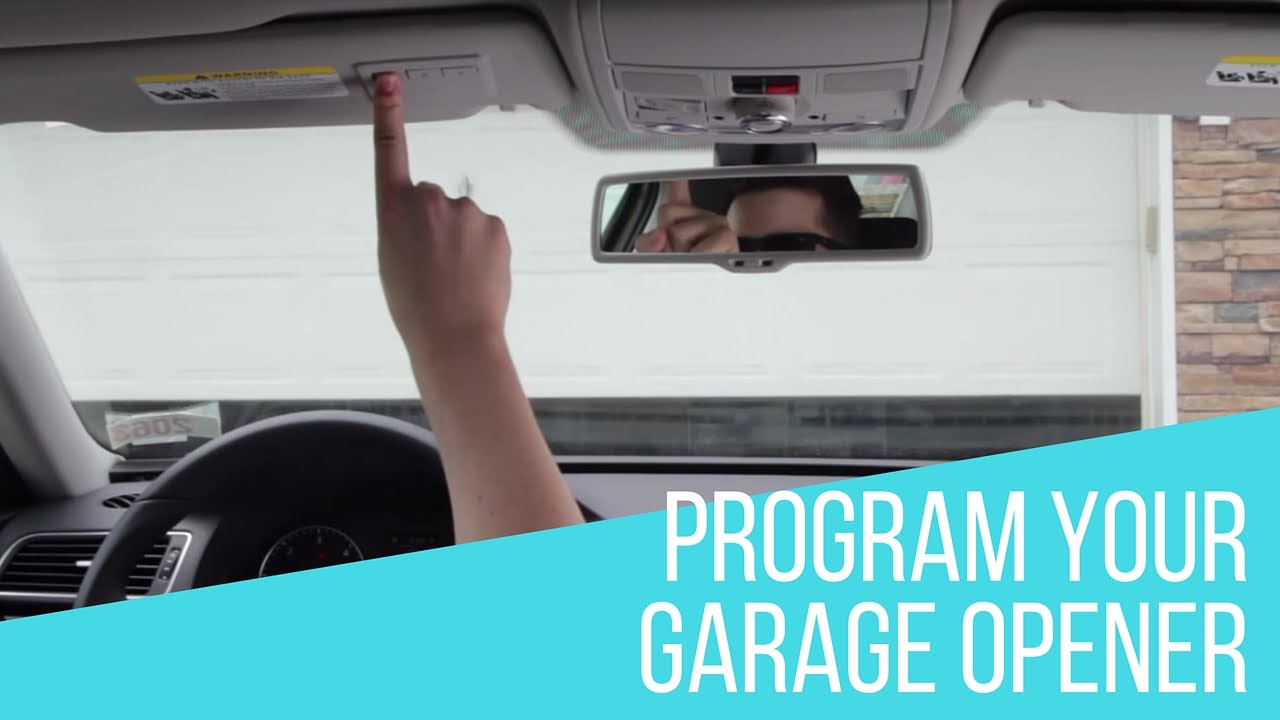
Quick Answer: How Do You Program a VW Garage Door Opener?
To program a VW garage door opener, park outside the garage, hold your handheld garage remote close to the in-vehicle HomeLink button, train the chosen button until the indicator changes, then test the door. If your garage opener uses rolling code, press the Learn or Smart button on the garage motor unit and return to the vehicle to finish the sync.
- Best first step: Confirm your handheld garage remote works before training HomeLink.
- Most common issue: The vehicle learns the remote signal, but the rolling-code Learn-button step is not finished.
- Reset need: Reset all buttons only when old codes are unknown or every button needs to be cleared.
- Local help: Volkswagen of Daphne can help if your VW HomeLink button blinks but the garage door still does not move.
Table of Contents
- VW HomeLink Basics, Button Locations, and Setup Checklist
- Rolling Code vs Fixed Code Garage Door Openers
- How to Program a Volkswagen Garage Door Opener
- How to Reset VW HomeLink or Reprogram One Button
- Tiguan, Atlas, ID.4, ID. Buzz, and Model-Specific Tips
- Why Your VW Garage Door Opener Is Not Working
- HomeLink vs Connected Garage Features
- Local Garage Opener Setup Tips for Daphne Drivers
- Key Takeaways
- Volkswagen Garage Door Opener FAQ
VW HomeLink Basics, Button Locations, and Setup Checklist
Key Takeaway: Before you start programming, identify your HomeLink buttons, confirm your handheld remote works, and decide whether you are setting up a new button, replacing one button, or clearing old settings.
Many Volkswagen vehicles with built-in garage door opener capability use HomeLink controls near the rearview mirror, overhead console, or interior control area, depending on model and model year. Because the exact placement can vary, start with your owner resources or look for the three programmable HomeLink buttons before training the system.
The setup works best when you prepare before pressing buttons. Bring the handheld garage remote into the vehicle, park outside the garage, keep the remote close to the in-vehicle controls, and make sure the garage door area is clear before testing. A weak handheld remote battery can make programming unreliable, so test the remote first before assuming the Volkswagen system is the issue.
Before You Start Programming VW HomeLink
- Park outside the garage, not under the moving door.
- Keep the handheld garage remote inside the vehicle.
- Confirm the remote opens and closes the door reliably.
- Choose which in-vehicle HomeLink button you want to program.
- Look for a Learn or Smart button on the garage motor unit.
- Clear old settings only if the vehicle is used or old codes are unknown.
For a Daphne homeowner, a clean setup can make daily entry easier when leaving for work, school drop-off, or errands. For a Mobile commuter, it can also remove the need to search for a loose remote before backing out in the morning.
Ask Us About VW HomeLink Setup
Rolling Code vs Fixed Code Garage Door Openers
Key Takeaway: If your garage door opener uses rolling code, your VW may appear to learn the remote but still need a final Learn-button sync at the garage motor before it works.
The difference between fixed code and rolling code is one of the most important parts of Volkswagen garage door opener programming. A fixed-code opener usually completes setup after the vehicle learns the handheld remote signal. A rolling-code opener adds a second security step at the garage opener motor unit.
That second step is where many drivers get stuck. The HomeLink indicator may change, the vehicle may seem trained, and the garage door may still do nothing. In that case, the programming is often unfinished, not broken.
| Comparison Point | Fixed Code Opener | Rolling Code Opener | What It Means for VW Owners |
|---|---|---|---|
| Setup flow | Usually one main training step | Training step plus Learn-button sync | Rolling-code systems need extra setup after the remote signal is learned |
| Common opener age | Often older systems | Often newer systems | Newer garage systems are more likely to need the final sync |
| Common symptom | Door works after training | Button blinks or seems trained, but door does not move | The opener may need the Learn-button sequence |
| Garage motor clue | May not rely on a Learn button | Usually has a Learn or Smart button | Check the motor unit before repeating the same vehicle step |
| Best next step | Test from a normal driveway position | Press Learn, return to vehicle, and complete the sync | Finish the full process before resetting everything |
For many LiftMaster, Chamberlain, Craftsman, Genie, and similar opener systems, the brand alone does not tell the whole story. The opener generation and Learn-button process matter more than the logo on the remote. If your VW HomeLink button blinks but does not activate the door, check for rolling-code setup before clearing the system.
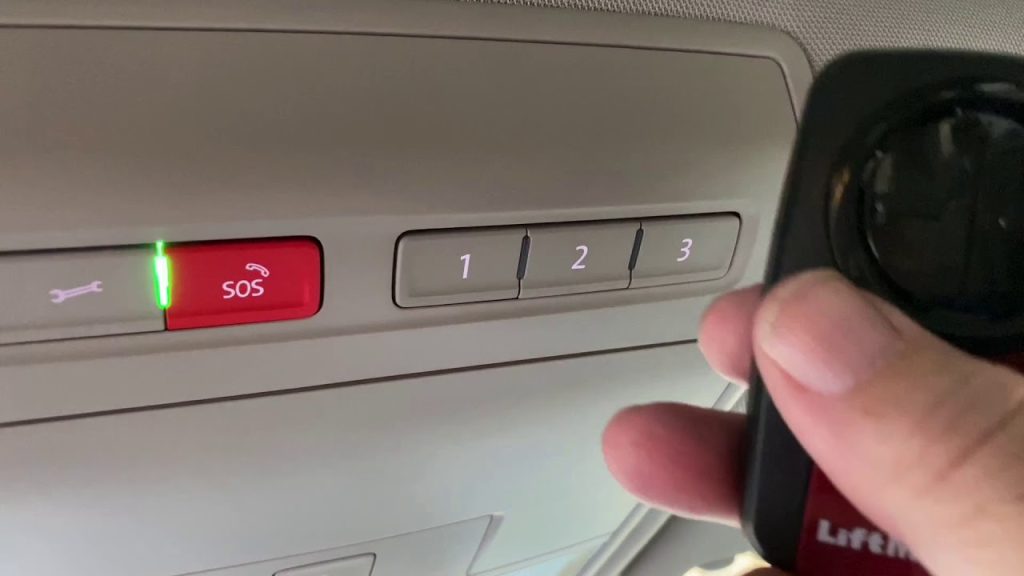
How to Program a Volkswagen Garage Door Opener
Key Takeaway: Program the in-vehicle button first, then complete the Learn-button step only if your garage opener requires rolling-code training.
The exact process can vary by Volkswagen model year and garage opener type, but the general HomeLink programming flow follows the same logic. Work slowly, test each step, and avoid clearing all buttons unless you truly need a full reset.
Step-by-Step VW HomeLink Programming
- Park safely outside the garage. Make sure the garage door has a clear path before testing.
- Choose the HomeLink button. Pick the in-vehicle button you want to assign to the garage door.
- Hold the handheld remote near the controls. Keep the remote close to the HomeLink area while training.
- Train the button. Press and hold the handheld remote button and the selected HomeLink button until the indicator changes.
- Test the programmed button. Press the in-vehicle button to see whether the door responds.
- Complete rolling-code setup if needed. If the door does not move, press the Learn or Smart button on the opener motor, return to the vehicle, and press the programmed HomeLink button again until the opener responds.
| Programming Stage | What to Do | Why It Matters | Common Mistake |
|---|---|---|---|
| Remote check | Test the handheld remote first | Confirms the remote is sending a strong signal | Trying to train HomeLink with a weak remote battery |
| Button selection | Choose one HomeLink button | Keeps setup organized | Training multiple buttons at once |
| Remote-to-vehicle training | Hold the remote close to the HomeLink controls | Helps the vehicle learn the signal | Holding the remote too far away |
| Rolling-code sync | Press Learn at the motor unit, then return to the vehicle | Completes the opener’s security handshake | Stopping after the first in-vehicle training step |
| Final test | Press the programmed button from your normal driveway position | Confirms real-world function | Only testing while parked too close to the motor |
If your VW garage door opener still does not work after training, do not immediately erase all buttons. First, check whether the opener requires rolling-code completion, whether the remote battery is weak, and whether the selected HomeLink button was already assigned to another device.
Schedule Volkswagen Assistance
How to Reset VW HomeLink or Reprogram One Button
Key Takeaway: Use a full VW HomeLink reset when old codes are unknown. Use single-button reprogramming when one garage assignment needs to change.
There are two different reset situations. A full reset clears stored HomeLink settings, which is useful if you purchased a used Volkswagen or do not know what the previous owner programmed. Single-button reprogramming is better when the other buttons still work and only one garage door assignment needs to change.
| Situation | Recommended Path | Why | Best For |
|---|---|---|---|
| You bought a used Volkswagen | Full reset | Clears unknown old codes | New owners of pre-owned vehicles |
| You moved to a new home | Single-button reprogram or full reset | Depends on whether the other buttons still matter | Drivers changing garage assignments |
| Only one garage door changed | Single-button reprogram | Protects other working HomeLink buttons | Multi-door households |
| Repeated programming attempts failed | Check rolling-code setup first, then consider reset | Prevents unnecessary clearing | Drivers stuck after several attempts |
| You are selling or trading your Volkswagen | Clear stored HomeLink settings | Removes home access from the vehicle | Trade-in and resale situations |
If you are preparing to trade your vehicle, it is smart to clear stored garage access before handing over the keys. You can also start your next upgrade with our trade appraisal page or compare available new Volkswagen inventory.
Tiguan, Atlas, ID.4, ID. Buzz, and Model-Specific Garage Door Opener Tips
Key Takeaway: Model-specific searches are a major opportunity for this page. Tiguan and Atlas queries are already generating visibility, and newer EV-related queries need clearer answers.
Drivers often search for Volkswagen garage door opener help by model, especially Tiguan and Atlas owners. That makes sense because button placement, trim availability, mirror controls, and digital menu expectations can vary across the Volkswagen lineup.
The overall setup logic is similar, but the first question should always be whether your specific Volkswagen has built-in HomeLink controls or a compatible connected-garage feature. After that, the garage opener type usually determines whether you need only remote-to-vehicle training or a rolling-code Learn-button sync.
| Volkswagen Model | Common Search Intent | What to Check First | Recommended Next Step |
|---|---|---|---|
| Volkswagen Tiguan | VW Tiguan garage door opener programming | HomeLink button location and opener type | Train the button, then complete rolling-code sync if needed |
| Volkswagen Atlas | VW Atlas garage door opener not working | Whether the Learn-button step was completed | Retry rolling-code setup before resetting all buttons |
| Volkswagen ID.4 | VW ID.4 garage door opener or connected garage setup | Model-specific owner resources and available features | Confirm whether you are using HomeLink or another connected path |
| Volkswagen ID. Buzz | ID. Buzz garage door opener | Feature availability and model-year setup flow | Use exact model guidance before assuming a mirror-button process |
| Volkswagen Jetta or Taos | VW HomeLink or garage opener button location | Interior control location and trim availability | Verify controls first, then follow HomeLink programming steps |
For shoppers comparing a vehicle upgrade, convenience features like HomeLink can be part of the daily-use experience. You can compare available models through our new Volkswagen inventory or review pre-owned options through our used Volkswagen inventory.
Tiguan Owners
If your Tiguan button trains but does not open the garage, check for rolling-code setup before resetting the system.
Atlas Owners
If your Atlas HomeLink button blinks but the door does not move, the Learn-button sync may still be incomplete.
ID.4 and ID. Buzz Owners
If you are using a newer Volkswagen EV, check exact model resources so you do not apply the wrong setup path.
Why Your VW Garage Door Opener Is Not Working
Key Takeaway: Most VW garage door opener problems are caused by incomplete rolling-code setup, weak handheld remote batteries, missed timing, or old stored codes, not a broken vehicle system.
If your Volkswagen garage door opener is not working, start with the simplest checks. Confirm the handheld remote still operates the door. Then check whether the vehicle button was trained at close range. After that, look for a Learn or Smart button on the opener motor unit.
| Problem | Likely Cause | What to Try | When to Ask for Help |
|---|---|---|---|
| HomeLink button blinks but door does not move | Rolling-code sync not complete | Press Learn at the motor, then return to the vehicle | If the timing window keeps expiring |
| Vehicle will not learn the remote | Weak remote battery or remote held too far away | Replace remote battery and retrain closer to the buttons | If multiple remotes fail |
| One HomeLink button works, another does not | Single button needs reprogramming | Reprogram the affected button only | If button behavior is inconsistent |
| Used vehicle has unknown garage settings | Old stored codes remain | Clear HomeLink memory and start fresh | If reset does not clear the issue |
| Door works only from very close range | Signal strength, interference, or remote battery issue | Retest the handheld remote and repeat training | If range stays poor after retraining |
For a Fairhope driver whose remote works but the Volkswagen button does not, rolling-code setup is often the missing step. For a Spanish Fort driver with a used VW, old stored codes may be interfering. For a Gulf Shores weekend driver who only uses the garage occasionally, a weak handheld remote battery can make the setup feel random.
Contact Us for Garage Opener Help
HomeLink vs Connected Garage Features
Key Takeaway: HomeLink is usually best for simple in-vehicle button access. Connected garage features may be better when compatible app-based access fits your routine.
HomeLink is straightforward. Once the button is programmed correctly, you press the in-vehicle control and the garage responds. This works well for drivers who want a simple built-in button and do not want to rely on a separate handheld remote.
Connected garage features may make sense for drivers who prefer app-based access, shared household controls, or connected-home routines. However, compatibility can vary by vehicle, garage system, model year, and available services, so verify your exact setup before assuming one method is better.
| Option | Best Use Case | Main Benefit | What to Verify |
|---|---|---|---|
| HomeLink | Daily in-vehicle garage access | Simple physical button convenience | Vehicle control location and opener compatibility |
| Connected garage feature | App-based or smart-home routines | Remote access and connected convenience | Vehicle, opener, app, and subscription compatibility |
| Handheld remote | Backup access | Works independently of vehicle programming | Battery strength and remote condition |
For many Daphne drivers, HomeLink is the most direct option. For newer Volkswagen owners, especially EV shoppers comparing technology features, it is worth checking model-specific guidance before choosing the setup path.
Local Garage Opener Setup Tips for Daphne Drivers
Key Takeaway: Treat garage opener setup as part of daily convenience. A working VW HomeLink button can make commutes, family errands, and stormy Gulf Coast days easier.
Garage door opener setup is not just a technology feature. It affects how easy the vehicle is to live with every day. When rain moves through the Eastern Shore, when you are getting home late from Mobile, or when you are leaving early from Daphne, a working in-vehicle garage button makes the routine smoother.
Local drivers tend to run into the same few scenarios: a used Volkswagen with old codes, a newer garage opener that needs rolling-code sync, a handheld remote with a weak battery, or a model-specific layout that is not obvious at first glance.
| Local Driver Scenario | Common Issue | Recommended Action |
|---|---|---|
| Daphne homeowner with a newer garage opener | Rolling-code setup not finished | Complete the Learn-button sequence at the motor unit |
| Mobile commuter | Remote clutter or inconsistent access | Program HomeLink for one-touch daily use |
| Fairhope family with multiple drivers | Several remotes and vehicles to manage | Program each vehicle carefully and document which button controls each door |
| Spanish Fort used VW buyer | Unknown old HomeLink codes | Reset HomeLink before adding new garage access |
| Gulf Shores weekend driver | Infrequent use and forgotten setup steps | Test HomeLink before relying on it for a trip or seasonal stay |
If you want help confirming whether your Volkswagen setup issue is coming from the vehicle, the remote, or the garage opener side, our team can help you walk through the process. You can also schedule support through our Volkswagen service page.
Key Takeaways
- Most VW garage door opener setups depend on whether the opener uses fixed code or rolling code.
- Rolling-code openers usually need a Learn-button sync after the in-vehicle button is trained.
- Do not reset all VW HomeLink buttons unless old codes are unknown or every button needs to be cleared.
- Tiguan and Atlas owners should check rolling-code setup first when the button blinks but the door does not move.
- ID.4 and ID. Buzz owners should verify model-specific resources before assuming the process matches older Volkswagen models.
- A weak handheld remote battery can make the Volkswagen system look like the problem.
Volkswagen Garage Door Opener FAQ
How do I program a Volkswagen garage door opener?
Start by parking outside the garage, bringing the handheld remote into the vehicle, and choosing the HomeLink button you want to program. Hold the remote near the in-vehicle controls and train the selected button. If your opener uses rolling code, press the Learn or Smart button on the garage motor unit and return to the vehicle to complete the sync.
Do I need to reset my Volkswagen garage door opener before programming it?
Not always. A full reset is useful if the vehicle is new to you or the old codes are unknown. If one button already works and you only need to update one garage door, single-button reprogramming is usually the better choice.
How do I know if my garage door opener uses rolling code?
A Learn or Smart button on the garage opener motor unit is a common clue that your opener may need rolling-code programming. If your Volkswagen button seems trained but the garage door does not move, complete the Learn-button sync before resetting the system.
Why is my Volkswagen HomeLink button blinking but not opening the garage?
A blinking HomeLink button can mean the vehicle learned part of the signal but the rolling-code process is not finished. Check the garage motor unit for a Learn or Smart button, complete the final sync, and then test the programmed button again.
How do I reset VW HomeLink?
VW HomeLink reset steps can vary by model and button layout, but the goal is to clear stored codes before starting fresh. Use a full reset when old codes are unknown or when preparing a vehicle for sale or trade. Use single-button reprogramming if only one garage assignment needs to change.
How do I program a VW Tiguan garage door opener?
For a Volkswagen Tiguan, first confirm the HomeLink control location and test your handheld remote. Train the selected in-vehicle button with the remote, then complete the garage motor Learn-button sync if your opener uses rolling code.
How do I program a VW Atlas garage door opener?
For a Volkswagen Atlas, use the same general HomeLink process: train the selected button with the handheld remote, then finish rolling-code setup at the garage opener motor if needed. If the Atlas button blinks but the door does not move, the Learn-button step may still be incomplete.
Can Volkswagen of Daphne help if my garage opener works with the remote but not the vehicle?
Yes. If the handheld remote works but the in-vehicle button does not, Volkswagen of Daphne can help you narrow down whether the issue is rolling-code timing, an old stored code, a weak training signal, or a model-specific setup question.
Volkswagen garage door opener setup can look simple until one missed step keeps the system from working. If you need help programming VW HomeLink, resetting an old code, troubleshooting a blinking button, or understanding a model-specific garage opener setup, Volkswagen of Daphne is here to help. Visit us at 29816 Frederick Blvd, Daphne, AL 36526, call 251-374-0664, explore our website at Volkswagen of Daphne, or contact our team online.

