Blog / Daphne Volkswagen Service

Changing Your Volkswagen Key Battery: A Simple Step-by-Step Guide

maxresdefault

How to Change a Volkswagen Key Battery Near Daphne, AL

Volkswagen of Daphne helps local drivers handle Volkswagen key battery replacement by following the right process for the key fob style in your hand, removing the emergency key, opening the case carefully, and installing the correct coin-cell battery with the proper polarity. In most cases, this is a quick DIY job for drivers seeing a key battery low alert, weak lock response, or shorter remote range, but the exact battery and opening method can vary by fob style.

Once you confirm the battery type and seat the new battery correctly, your key should return to normal function without programming. This guide explains how to identify the right battery, open a VW key fob safely, replace the battery step by step, avoid common mistakes, and know when it makes more sense to let our team help.

A Volkswagen key battery replacement is the process of removing the depleted coin-cell battery inside a VW key fob and installing the correct new battery. It is designed to restore remote locking, unlocking, and push-button start convenience for drivers in Daphne, Fairhope, Spanish Fort, Mobile, Foley, and Gulf Shores.

Quick Answer: How Do You Change a Volkswagen Key Battery?

To change a Volkswagen key battery, remove the emergency key, find the seam in the key fob, open the case carefully, remove the old coin-cell battery, and install the new battery in the same orientation. Many Volkswagen key fobs use a CR2032-style battery, but you should always confirm the exact battery code printed on your old battery before replacing it.

  • Best first step: Remove the emergency key and inspect the fob seam.
  • Most common mistake: Installing the new battery upside down.
  • Programming: Most routine VW key battery changes do not require reprogramming if the key worked before the old battery died.
  • Local help: Volkswagen of Daphne can help confirm the right battery or inspect the key if it still does not work.

Volkswagen Key Battery Basics, Battery Types, and Fob Styles

Key Takeaway: Identify the exact fob style and battery orientation before you pry anything open. The right battery and the right opening method matter more than speed.

Signs Your VW Key Battery Needs Replacement

The most common warning signs are easy to miss at first. Many drivers notice the locks respond from a shorter distance, the buttons need to be pressed twice, or the vehicle displays a low key battery warning. Those are the right first clues to act on before a minor annoyance turns into a no-response key on a busy morning.

For Daphne commuters who leave early and park far from the office, a weakening key battery usually shows up as reduced range long before the key goes dead. For Fairhope parents juggling school drop-off, grocery stops, and afternoon pickup, the warning may feel random because the key works once, then misses the next press. In both cases, replacing the battery early is the better move before assuming the fob itself has failed.

  • The key still works, but only when you are standing close to the door.
  • Lock and unlock response feels delayed or inconsistent.
  • Push-button start requires you to hold the key closer than usual.
  • Your spare key works better than the one you use every day.
  • The vehicle displays a low key battery message.

This is also where it helps to separate a key battery issue from a vehicle battery issue. A weak key fob battery affects remote access and convenience. A weak vehicle battery may show up as slow cranking, clicking, or a no-start condition. If your main battery is the concern, our team can inspect it through our VW battery service in Daphne, AL.

Battery Type Reference Table for Common Volkswagen Key Fobs

Most Volkswagen owners are dealing with a coin-cell battery replacement, and the safest move is to verify the exact battery inside the fob before buying a replacement. CR2032 batteries are common across many Volkswagen key fobs, but you should still check the old battery marking and your owner resources first so you do not force the wrong cell into the housing.

That verification step matters because a battery that looks almost right can still create poor contact, weak performance, or a broken clip. For Spanish Fort drivers with newer smart keys, opening the fob carefully and reading the old battery marking is the safest first step.

Volkswagen Key Fob StyleCommon Battery CheckpointTypical Opening CueWhat to VerifyBest For
Older switchblade-style VW keyConfirm marking on existing batteryVisible seam, often needs gentle pry toolBattery code and positive-side orientationOlder Jetta, Passat, or Tiguan-style keys
Newer smart key with emergency keyConfirm old battery marking before buying replacementBack seam opens after emergency key is removedPolarity and battery seat fitNewer VW push-button start keys
Spare key stored long-termCompare with your daily key before replacementOpen only after checking battery conditionBattery age and any corrosionFamilies keeping a backup key at home
Daily-use key in high heatConfirm battery type and contact tensionStandard seam opening after emergency key removalClip tension and correct seatingGulf Coast drivers exposed to heat and humidity
Key with worn shell or buttonsVerify battery and case condition togetherHousing may flex or separate unevenlyBroken tabs, torn buttons, or loose contactsOwners whose issue may be more than battery-related
Unsure which key type you haveCheck owner resources and compare key shapeMatch fob design before openingTool need, battery code, and orientationFirst-time VW owners and DIY beginners

Tip: Battery type can vary by key design. Always confirm the printed battery code on the old battery before installing a replacement.

We recommend keeping one fresh coin-cell battery at home if you drive your VW every day, especially if you split time between Daphne and Mobile or keep a second key in reserve. Spare keys often lose battery power quietly because they sit unused for long stretches, then fail the first time you need them.

Order Genuine VW Parts

Older vs Newer Volkswagen Key Fobs and What Changes in the Process

Older Volkswagen key fobs and newer smart keys usually follow the same logic, but they do not always open the same way. Older fobs often need a small flat tool at the seam after you remove the emergency key. Newer fobs usually separate more easily by hand once the emergency key is out and you work at the correct split point.

That difference matters because this is where owners crack plastic tabs or scratch the shell. Slow down at this stage and avoid forcing the case. If the housing does not separate with light, controlled pressure, stop and confirm you are working at the correct seam.

For a Mobile commuter using a newer push-button start key, the faster method is not always the safer method if the seam location is wrong. For a Foley driver with an older switchblade-style key, a tiny flat tool can help, but only if you use it gently and avoid digging into the housing. We also recommend checking both halves of the shell for loose tabs before reassembly.

If the battery is new but the shell is damaged, the button pad is worn, or the contacts are bent, the problem is no longer just battery-related. In those cases, our service and parts team can help you decide whether a battery swap, shell replacement, or key diagnosis makes more sense.

See Our New Volkswagen Inventory

How to Open a VW Key Fob Without Damaging It

Key Takeaway: Remove the emergency key first, identify the case seam, and use light pressure. Forcing the shell is the fastest way to damage the fob.

The safest way to open a VW key fob is to remove the emergency key first, identify the case seam, and apply gentle pressure at the correct opening point. Do not force the plastic shell. If the fob does not separate with light pressure, stop and confirm the seam before using a small tool.

For many newer Volkswagen smart keys, the rear cover separates after the emergency key is removed. Older switchblade-style keys may need a small flat tool at the seam. In both cases, the goal is to open the housing slowly so you do not crack the shell, bend the contacts, or damage the internal clips.

  • Remove the emergency key before opening the fob.
  • Look for the case seam instead of prying at random.
  • Use a plastic trim tool when possible to reduce scratches.
  • Keep track of the old battery orientation before removing it.
  • Stop if the shell bends, creaks, or does not close evenly.

If the fob housing feels loose, cracked, or difficult to close, contact our team before forcing it. A damaged shell can make a fresh battery act like a weak or dead battery.

Ask Our Team About VW Key Help

Step-by-Step Volkswagen Key Battery Replacement and Troubleshooting

Key Takeaway: Replace the battery in a clean, well-lit spot, check the old battery code before installation, and confirm the positive side faces the same direction as the original.

How to Replace the Battery in Older and Newer VW Key Fobs

The safest process starts the same way for both older and newer Volkswagen keys. Remove the emergency key first, identify the seam, open the case carefully, remove the old battery, and install the new battery in the same orientation. After that, snap the shell back together and test lock, unlock, and panic functions before you call the job finished.

StepOlder VW Key FobNewer VW Smart KeyWhy It MattersBest For
Remove emergency keyPress release and pull key outPress release and pull key outGives you access to the opening pointAll Volkswagen owners
Open the housingUsually needs gentle pry at seamOften separates by hand at rear seamPrevents broken tabs and cosmetic damageDIY owners working slowly and carefully
Remove old batteryLift out with care using small tool if neededLift out after shell separatesAvoids damaging contactsOwners replacing first battery at home
Install new batteryMatch original orientation exactlyMatch original orientation exactlyWrong polarity means no functionDrivers fixing weak lock response
Reassemble keySnap shell together evenlySnap shell together evenlyUneven pressure can leave gaps or loose fitOwners who want a clean close and good button feel
Test operationCheck lock, unlock, and rangeCheck lock, unlock, and rangeConfirms issue is resolved before you leaveCommuters and families who need reliable daily use

The key difference between older and newer Volkswagen key battery replacement is usually the opening method, not the basic battery-swap logic. The older-fob method makes sense when the housing clearly needs a gentle pry tool. The newer-fob method works when the case is designed to separate after the emergency key comes out. For most Daphne owners, the right method is the one that matches the exact fob style in your hand.

Basic steps:

  1. Remove the emergency key from the fob.
  2. Locate the correct seam before applying pressure.
  3. Open the housing carefully, not forcefully.
  4. Read the old battery code before inserting the new one.
  5. Install the replacement with the same orientation as the original.
  6. Snap the shell closed evenly and test all buttons.

If you want an extra layer of confidence before you start, our parts team can help you order the right replacement through our VW parts ordering page.

Order the Right Battery or Parts

If Your VW Key Still Does Not Work, Practical Fixes by Driver Scenario

If the key still does not respond after the battery change, the next step is to work through the likely causes in order. In many cases, the issue is one of four things: the battery is installed backward, the replacement battery is wrong, the battery is not seated firmly against the contacts, or the key housing has wear or internal damage.

No Response

Reopen the fob and check battery polarity first. A new battery installed backward can act like a dead battery.

Short Range

Check whether the battery is fresh, correctly seated, and making firm contact with the internal clips.

Loose Buttons

Inspect the shell, button pad, and tabs. If the housing does not close evenly, the issue may not be the battery.

For a Mobile commuter whose key stopped responding after a quick parking lot battery swap, check polarity first. For a Gulf Shores weekend driver who keeps a spare key in a drawer, test both keys because a dead spare key can make it look like a broader issue. For a Spanish Fort driver whose buttons feel mushy or loose after reassembly, inspect the shell and button pad before assuming the battery is the problem.

  • If you changed the battery and the key still does nothing, check battery orientation and seating first.
  • If you used a battery that only seemed to fit, replace it with the exact code from the old battery.
  • If the shell will not snap together cleanly, stop before a tab breaks.
  • If the key works only at very close range, check contact pressure and battery freshness.
  • If the vehicle has no start-related symptoms but remote functions are weak, focus on the key first, not the main battery.

Most key battery replacements do not require reprogramming. If the key worked before the old battery died and the fob hardware is still in good shape, installing the correct battery the right way is often enough to restore normal operation. When it does not, that is usually the cue to inspect the key body, the contacts, or a separate starting-system concern.

Ask Our Team About Key Fob Help

If you would rather not guess your way through a key battery issue, we are ready to help in person at our showroom and service center at 29816 Frederick Blvd, Daphne, AL 36526. Our team can help you confirm the right replacement battery, inspect the fob housing for broken tabs or worn buttons, and point you toward the right next step if the problem is bigger than a simple coin-cell swap.

You can set up a visit through our Schedule Service page. If you need a general main-battery check at the same time, we can handle that too.

Schedule Volkswagen Key Battery Help
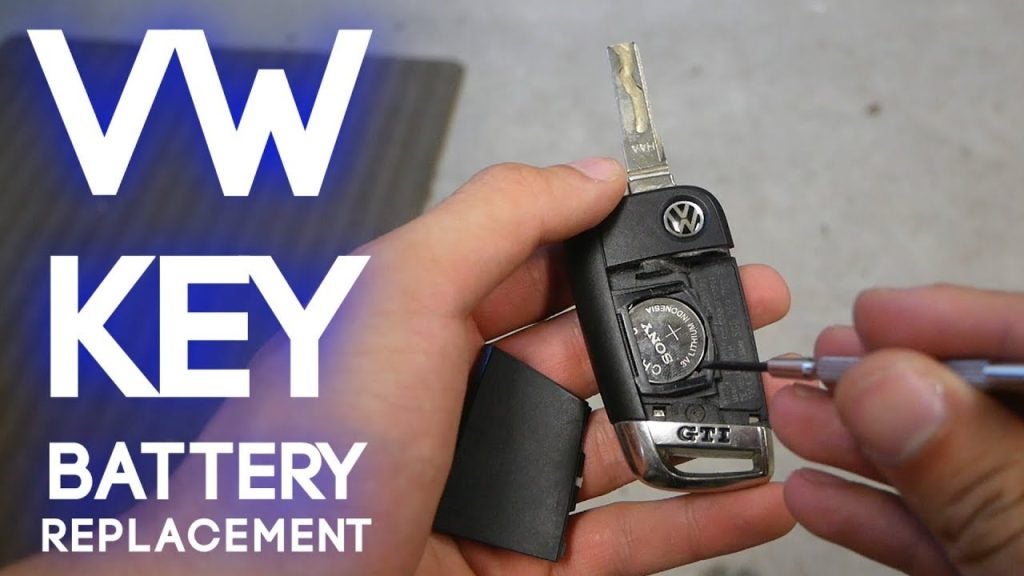
VW key battery replacement guide from Volkswagen of Daphne

Why This Matters for Daphne Drivers and Gulf Coast Ownership

Key Takeaway: Treat a weak VW key battery early on the Gulf Coast because heat, humidity, and heavy daily use can make small electronic problems show up at the worst times.

Local Conditions, Daily Use, and Why VW Key Batteries Fail at Inconvenient Times

Here on the Eastern Shore, convenience matters because most drivers are moving between errands, commutes, and family stops rather than using the key once or twice a day. That means a weak battery can show up at the grocery store, in a school line, or in a parking lot before a trip over to Mobile. Early replacement helps prevent a small issue from turning into a daily disruption.

For a Fairhope parent managing sports practice, school pickup, and grocery runs, remote range matters because every missed button press slows down an already packed day. For a Spanish Fort commuter crossing I-10, a spare key that has been sitting untouched for months can create a bad surprise right before an early departure. For a Gulf Shores weekend driver, long stretches of non-use followed by sudden heavy use are exactly the pattern that makes spare-key batteries fail when you finally need them.

Local Driver SituationWhat Usually HappensWhat We RecommendWhy It HelpsBest For
Daily commute from Daphne to MobileReduced remote range gets ignored for weeksReplace the battery at first warning signAvoids a complete no-response key on a workdayLong-distance commuters
Fairhope family errand scheduleButtons work inconsistently in quick stop-and-go useKeep one spare coin cell and test both keysRestores daily convenience and cuts stressParents and carpool households
Spanish Fort early-morning departuresSpare key sits unused until neededTest the backup key before travel weeksPrevents surprise failureCommuters and shared-vehicle households
Gulf Shores weekend travelHeat, humidity, and long storage periods reduce confidenceReplace old battery before summer tripsImproves reliability away from homeBeach-trip and seasonal drivers
Foley DIY ownerUnsure if issue is key or vehicle batteryCompare key symptoms with starting symptomsHelps identify the right repair pathBudget-conscious owners
Eastern Shore multi-driver familyOne key works better than the otherReplace weaker battery and inspect both fobsKeeps both drivers coveredHouseholds with two regular drivers

The best time to replace a weak Volkswagen key battery is before it becomes a daily interruption. This is especially true for drivers around Daphne, Fairhope, Spanish Fort, and Gulf Shores because local heat, humidity, and mixed-use driving patterns make small battery issues easy to ignore until the key suddenly stops responding.

If you are not sure whether you need a simple battery swap, a replacement part, or a closer look at the fob itself, our service and parts teams can help. If you want to handle the repair yourself, we can point you toward the right battery and genuine parts through our Order Parts page. If you would rather have our team help, you can start with Contact Us or set up service online.

Contact Us for Key or Battery Support

Technical Deep Dive: Why Battery Polarity, Contact Pressure, and Fob Fit Matter

Key Takeaway: A correct battery installed poorly can act just like a dead battery. Battery orientation, contact pressure, and shell fit all matter.

The positive side of the coin-cell battery needs to face the same direction as the original battery you removed. That sounds simple, but this is where many quick DIY repairs go wrong. If the battery is flipped, the key will not respond even though the cell is new.

Contact pressure matters almost as much as polarity. If the battery sits loosely, the terminals may connect only intermittently, which shows up as weak range, delayed button response, or a key that works one minute and misses the next. This can happen when the old battery is pried out aggressively and one of the internal clips gets bent slightly out of position.

Fob fit also matters more than most people expect. If the shell does not snap together evenly, the battery can shift, the button pad may not seat cleanly, and the key can feel inconsistent even after a fresh battery goes in. For a Daphne driver who wants a true one-and-done fix, stop the moment the shell resists reassembly and let our team look at it before the housing tabs break.

Ownership Cost Analysis: DIY Key Battery Change vs Dealership Help

Key Takeaway: DIY battery replacement can make sense when the fob is intact and the process is clear. Dealership help is the smarter value when the shell, buttons, or contacts look questionable.

A simple key battery replacement is one of the VW ownership tasks that many drivers can handle at home without much time or cost. If your fob opens cleanly, the battery code is clear, and the shell is in good condition, DIY can make sense. For a Foley owner who wants the lowest-cost fix and already has a replacement battery ready, that is usually the most efficient path.

Dealership help becomes the better value when the problem may be more than the battery. If the shell flexes strangely, the buttons are worn, the key only works at very close range after replacement, or you are unsure which battery belongs inside, let our team step in before the housing gets damaged. That is especially true for busy households that cannot afford trial and error on the only key they use daily.

  • DIY is a good fit when the fob is intact, the battery code is confirmed, and the housing opens normally.
  • Dealership help is recommended when the shell is damaged, the battery orientation is unclear, or the key still fails after replacement.
  • In-person help also makes sense if you want key and main-battery concerns checked during the same visit.

Get Your Trade Appraisal

Key Takeaways

  • Most VW key battery replacements are quick once you confirm the correct coin-cell battery and fob style.
  • Reduced range, delayed lock response, and low key battery warnings are common early signs.
  • Older and newer Volkswagen key fobs usually differ more in opening method than in replacement logic.
  • For Daphne and Gulf Coast drivers, heat, humidity, and spare-key storage make early replacement a smart move.
  • If the key still fails after a new battery, check polarity, fit, and housing condition before assuming a larger problem.

Volkswagen Key Battery FAQ for Daphne Drivers

What battery does a Volkswagen key fob usually use?

Many Volkswagen key fobs commonly use a CR2032-style coin-cell battery, but the safest approach is to confirm the exact code printed on the old battery before installing a replacement. Fob styles can vary, so first-time VW owners in Daphne should open the fob carefully, read the battery marking directly, and replace it with the same code.

Check VW Battery Service Options

Do I need to reprogram my Volkswagen key after replacing the battery?

In most routine battery changes, reprogramming is not necessary. If the key worked normally before the old battery weakened and the new battery is the correct size and installed with the right polarity, the fob usually returns to normal operation on its own. Recheck battery seating and orientation before assuming a programming issue.

Why is my Volkswagen key still not working after I changed the battery?

The most likely causes are incorrect polarity, the wrong replacement battery, poor contact pressure, or a damaged shell. Reopen the fob and compare the new battery position to the old one, then check whether the battery sits firmly in place. If that does not fix it, our team can inspect the key and help determine the next step.

Can Volkswagen of Daphne help if the key shell or buttons are damaged?

Yes. If the issue is no longer just the battery, Volkswagen of Daphne can help you sort out whether the next step is parts support, service inspection, or another key-related repair path. If the shell will not close correctly or the buttons feel loose, let us look at it before further damage turns a small problem into a bigger one.

What battery does a 2024 or 2025 Volkswagen Tiguan key fob use?

Many Volkswagen Tiguan key fobs use a coin-cell battery such as a CR2032, but the safest answer is to confirm the battery code printed on the old battery before installing a replacement. Fob style, production timing, and key design can vary, so Volkswagen of Daphne recommends checking the old battery marking or contacting our parts team before replacing it.

How do I change the battery in a VW Tiguan key fob?

To change the battery in a VW Tiguan key fob, remove the emergency key, open the key fob housing at the correct seam, remove the old battery, and install the new battery in the same orientation. After closing the shell evenly, test lock, unlock, and start functions before leaving home.

How do I know if my VW key battery is installed backward?

If your VW key does not respond after a fresh battery is installed, the battery may be upside down or not seated firmly against the contacts. Reopen the fob, compare the positive side with the original battery orientation, and make sure the shell closes evenly.

Can Volkswagen of Daphne replace my key fob battery?

Yes. Volkswagen of Daphne can help local drivers confirm the correct replacement battery, inspect the fob housing, and determine whether the issue is a simple battery replacement or a key fob hardware concern.

We know a weak Volkswagen key battery can feel like a small issue right up until it interrupts your day. When you visit us at 29816 Frederick Blvd, Daphne, AL 36526, we can help you confirm the right battery, inspect the fob, and point you toward service or parts support that fits the situation. We are proud to serve drivers from Daphne, Fairhope, Spanish Fort, Mobile, Foley, and Gulf Shores. If your key battery warning is showing up now or your fob has already started acting up, start with our website at Volkswagen of Daphne or call us at 251-374-0664.
Posted in:

Related Posts

Volkswagen Carefree Maintenance: What the First Two Scheduled Services Include

Volkswagen Carefree Maintenance: What the First Two Scheduled Services Include

Core Services Covered: Synthetic Oil Changes, Tire Rotations, and Fluid Top-Offs If you just bought a new Volkswagen from Volkswagen of Daphne, you have probably heard the phrase "Carefree Maintenance" mentioned somewhere between the finance office and your first oil change reminder. It is one of several protections Volkswagen currently bundles under an umbrella it calls Carefree Coverage, and it is worth understanding before your first service visit arrives. Current Volkswagen materials describe Scheduled Carefree Maintenance as covering the first two scheduled maintenance services on a new Volkswagen, generally for 2 years or 20,000 miles, whichever comes first. That is a general current-terms snapshot, not a guarantee for every vehicle on our lot, and we recommend confirming the exact terms that apply to your specific model year with our service team or in your owner's and warranty literature before you rely on it. This article walks through what Carefree Maintenance generally includes, how it fits alongside Roadside Assistance and the New Vehicle Limited Warranty, and what a new owner should verify at delivery and again before each covered visit. Coverage language can change by model year, so treat everything below as a planning reference rather than a final word on your particular vehicle. Volkswagen Carefree Maintenance Guide: Covered Services, Terms & FAQs What Is Volkswagen Carefree Coverage? What the First Two Scheduled Services Typically Cover Carefree Maintenance vs. Roadside Assistance vs. the New Vehicle Limited Warranty Scheduling Your Covered Service Near Daphne Key Takeaways FAQ What Is Volkswagen Carefree Coverage? Volkswagen Carefree Coverage is the umbrella term Volkswagen currently uses to describe a set of protections that come with a new Volkswagen vehicle. Carefree Coverage generally includes three separate pieces: Scheduled Carefree Maintenance for the first two factory-scheduled services, Roadside Assistance for breakdown-type support, and the New Vehicle Limited Warranty for defects in materials or workmanship. Connected-service plan terms that ride alongside these protections vary by model year and vehicle, so a Jetta and an ID.4 purchased in different years will not necessarily carry identical language. It helps to think of Carefree Coverage as a package with three distinct jobs rather than one blanket promise. Scheduled Carefree Maintenance addresses routine service, the kind every vehicle needs regardless of whether anything is wrong. Roadside Assistance addresses the unexpected, a dead battery or a flat tire in a parking lot. The New Vehicle Limited Warranty addresses defects, meaning something that should not have gone wrong in the first place. Each piece has its own duration, and understanding where one ends and another begins helps you plan your ownership costs more accurately. We want to be direct about one naming issue that causes confusion online. Volkswagen previously used a different name for its new-vehicle warranty program, and some older articles and forum posts still reference that retired term. The current 4-year or 50,000-mile New Vehicle Limited Warranty, whichever comes first, should not be confused with that legacy branding. If you see the older term referenced anywhere, treat it as outdated and ask our service team to confirm the language that applies to your specific vehicle and model year. What the First Two Scheduled Services Typically Cover Scheduled Carefree Maintenance is built around your vehicle's factory maintenance schedule, the interval-based list of services found in your owner's literature. Current Volkswagen materials describe this coverage as generally applying for 2 years or 20,000 miles, whichever comes first, and generally extending to the first two scheduled maintenance visits called for in that factory schedule. In practical terms, that typically includes services such as oil and filter changes called for at the intervals your specific model requires, though the exact itemized list depends on the model, the engine, and the model year, and should be confirmed against your owner's manual and maintenance schedule rather than assumed from a general description. The "whichever comes first" structure is the part that trips up a lot of new owners, so it is worth walking through with a plain example. Say a driver commutes daily between Fairhope and a job near the Bayway, racking up more highway miles than a typical owner. If that driver reaches 20,000 miles in 14 months, the mileage limit would generally be reached well before the 2-year mark, and that portion of coverage would generally end at that point rather than waiting for the full two years to elapse. A driver who puts on far fewer miles each year might instead reach the 2-year mark first, with plenty of mileage still left on paper. Either limit, once reached, generally closes out that piece of coverage, regardless of which one arrives first. This structure is common across manufacturer maintenance programs because it protects against both extremes. A time-only limit would shortchange low-mileage owners who still need service sooner due to age-related wear on fluids and components. A mileage-only limit would shortchange owners who drive heavily in a short window and would otherwise blow past reasonable service intervals before the clock ran out. Pairing the two limits and ending coverage at whichever arrives first gives Volkswagen a predictable, consistent boundary regardless of how an individual owner uses the vehicle. What is not generally included matters just as much as what is. Wear items outside the factory-scheduled intervals, any service prompted by damage or misuse rather than routine scheduling, and anything beyond the two covered visits fall outside Scheduled Carefree Maintenance as currently described. Before assuming a specific repair or service item is covered, we recommend confirming it with our service advisors, since the exact covered scope depends on your model, your engine, and the maintenance schedule assigned to your specific vehicle. Coverage Type General Term What It's Generally For Scheduled Carefree Maintenance Generally 2 years / 20,000 miles, whichever comes first The first two scheduled maintenance services Roadside Assistance Generally 3 years / 36,000 miles, whichever comes first Roadside/breakdown-type support New Vehicle Limited Warranty Generally 4 years / 50,000 miles, whichever comes first Defect coverage Terms are a current planning snapshot and vary by model year; confirm your vehicle's exact terms with Volkswagen of Daphne or your owner's/warranty literature. Generally Included Confirm Before Assuming Covered Factory-scheduled maintenance items such as oil and filter changes called for in your model's maintenance schedule, within the term limits above Specific itemized services beyond the general factory schedule The first two scheduled service visits as defined by your model's maintenance intervals Tire rotations are excluded under current published terms; ask about wear items such as tires, brake pads, and wiper blades Coverage that runs until either the time or mileage limit is reached, whichever comes first Anything falling outside the factory-scheduled service intervals for your exact model and model year Both tables above describe general current terms. The exact itemized list of what is performed at each scheduled visit depends on your vehicle's model, engine, and model year, and is spelled out in your owner's manual and maintenance schedule rather than in general marketing language. Carefree Maintenance vs. Roadside Assistance vs. the New Vehicle Limited Warranty These three protections solve different problems, and understanding the distinction helps you know which one to lean on in a given situation. Scheduled Carefree Maintenance exists for planned, routine service, the kind every vehicle needs on a predictable schedule whether or not anything is malfunctioning. Roadside Assistance exists for the unplanned moment when your vehicle will not start, has a flat tire, or leaves you stranded somewhere between Daphne and Mobile. The New Vehicle Limited Warranty exists for a different category entirely: a defect in materials or workmanship, something that should not have failed under normal use. Because each protection runs on its own clock, more than one can be active at the same time, and they can also expire at different points depending on how you drive. Using the general terms above, Scheduled Carefree Maintenance generally runs out first at 2 years or 20,000 miles, Roadside Assistance generally continues further to 3 years or 36,000 miles, and the New Vehicle Limited Warranty generally extends the longest at 4 years or 50,000 miles. A vehicle that has used up its two covered maintenance visits can still be well within its roadside assistance window and its warranty period. Knowing where each boundary falls helps you avoid assuming that one expiring protection means all of them have ended. Protection Generally Lasts Until Scheduled Carefree Maintenance 2 years or 20,000 miles, whichever comes first Roadside Assistance 3 years or 36,000 miles, whichever comes first New Vehicle Limited Warranty 4 years or 50,000 miles, whichever comes first At a given mileage or age, this table can help you see at a glance which protections are still likely active and which have likely run their course, though we still recommend confirming your vehicle's actual status with our service team rather than estimating from general terms alone. If any of this feels like a lot to track on your own, that is fair. Our service team at Volkswagen of Daphne can look up your specific vehicle's history and confirm exactly where you stand on each piece of Carefree Coverage, rather than leaving you to estimate based on general published terms. We recommend bringing your VIN or vehicle information when you call or visit, since coverage specifics are tied to your exact vehicle and model year rather than to the model line in general. Scheduling Your Covered Service Near Daphne Getting a covered service on the calendar is straightforward, and doing it at the right interval protects both your vehicle and your coverage status. Our service center can confirm whether your upcoming visit falls within your two covered maintenance services and can walk you through what your specific model's factory schedule calls for at that interval. If you are unsure whether you have already used one or both of your covered visits, our team can pull up your service history and tell you where you stand before you arrive. We recommend scheduling before a covered service window closes rather than waiting until you are close to the mileage or time limit. If you are commuting regularly along US-98 or I-10 between Daphne, Spanish Fort, and Mobile, your mileage can climb faster than the calendar suggests, and reaching 20,000 miles ahead of schedule is common for higher-mileage commuters in our area. Calling ahead gives our advisors time to confirm parts availability and gives you a service appointment that fits your schedule rather than a rushed visit squeezed in at the last mile. If you recently purchased your Volkswagen and have not yet reviewed your coverage documents in detail, our team can also walk through them with you at your first visit. Understanding what is covered, what generally is not, and when each protection generally ends puts you in a better position to plan ahead rather than being surprised by a bill for something you assumed was included. For shoppers who have not yet purchased and want to understand these protections before buying, our Why Volkswagen of Daphne page and our new inventory can both be a useful starting point. Key Takeaways Volkswagen currently describes Carefree Coverage as an umbrella covering Scheduled Carefree Maintenance, Roadside Assistance, and the New Vehicle Limited Warranty, with each running on its own general timeline. Scheduled Carefree Maintenance generally covers the first two scheduled maintenance services for 2 years or 20,000 miles, whichever comes first, based on current Volkswagen materials. Roadside Assistance generally runs longer, to 3 years or 36,000 miles, whichever comes first, and covers breakdown-type support rather than routine service. The New Vehicle Limited Warranty generally extends to 4 years or 50,000 miles, whichever comes first, and addresses defects rather than scheduled upkeep. The current 4-year/50,000-mile New Vehicle Limited Warranty should not be confused with Volkswagen's older, now-retired warranty branding. Exact itemized coverage, mileage status, and remaining protection windows vary by model year and should be confirmed with our service team rather than assumed from general terms. FAQ What happens after my two covered scheduled services end? Once you have used both covered visits, or once the 2-year/20,000-mile general limit is reached, whichever comes first, scheduled maintenance after that point is generally handled as a standard paid service rather than under Carefree Maintenance. Our service team can confirm your exact status and walk you through what your model's maintenance schedule calls for next. Does Carefree Maintenance cover tire rotations? No. Volkswagen's current published Carefree Maintenance terms explicitly exclude tire rotations. The program covers the scheduled maintenance services described in your vehicle's maintenance booklet, within the applicable time and mileage limits. Contact Volkswagen of Daphne for your vehicle's exact covered services and any separate tire-rotation charges. Is Carefree Maintenance the same thing as my warranty? No. Scheduled Carefree Maintenance covers routine, planned service items on a set schedule, while the New Vehicle Limited Warranty covers defects in materials or workmanship. They run on different general timelines (generally 2 years/20,000 miles versus generally 4 years/50,000 miles) and serve different purposes, so one ending does not mean the other has ended too. What if I reach 20,000 miles before my second year of ownership? Under the general "whichever comes first" structure, reaching the mileage limit before the time limit generally closes out that portion of Scheduled Carefree Maintenance at that point, rather than waiting for the full two years to pass. If you drive above-average annual mileage, it is worth checking in with our service team periodically so you know where your coverage stands. Volkswagen Carefree Coverage gives new owners a useful general framework for understanding what is covered in the early years of ownership, but the specifics depend on your exact vehicle and model year. Scheduled Carefree Maintenance, Roadside Assistance, and the New Vehicle Limited Warranty each run on their own general timeline, and knowing the difference helps you plan service visits and ownership costs with fewer surprises. Before your next scheduled visit, we recommend confirming your vehicle's exact Carefree Coverage terms with our service team rather than relying on general published figures alone. You can reach our service department at 228-291-2035, our parts department at 228-291-2033, or our sales team at 251-374-0664, or visit us at 29816 Frederick Blvd, Daphne, AL 36526. Our team at Volkswagen of Daphne is glad to look up your vehicle's history and schedule your covered service at the right time. Plan Your Volkswagen Carefree Maintenance Visit in Daphne Visit Our Volkswagen Service Center Call Service: 228-291-2035 Related Volkswagen Insights & Updates How to Maintain Your Volkswagen in the New Year Read More Are Volkswagens Expensive to Maintain? VW Maintenance Cost Guide Read More Your Guide to Volkswagen Battery Replacement Read More Volkswagen Tire Replacement Signs Read More

Why Storm Season Matters for Volkswagen Owners on the Gulf Coast

Hurricane Season Volkswagen Prep: A Storm-Readiness Checklist for Eastern Shore Drivers

Eastern Shore Storm Preparedness: Safeguarding Your Vehicle Along Mobile Bay Preparing your Volkswagen for hurricane season means checking the systems most likely to fail under storm conditions before a storm ever forms, and building a basic emergency kit you can grab quickly if evacuation becomes necessary. The short list includes a battery test, a look at tire tread and pressure, working wipers and washer fluid, functioning lights and brakes, and a full fuel tank whenever a storm enters the forecast. None of this makes any vehicle safe to drive through floodwater. Official guidance from agencies such as the National Highway Traffic Safety Administration (NHTSA) and the Federal Emergency Management Agency (FEMA) is consistent on that point: no vehicle, regardless of drivetrain, should attempt to cross a flooded road. Volkswagen of Daphne serves drivers across Baldwin County and Mobile County, an area that sits squarely inside the Atlantic hurricane season each year. We put this checklist together so Eastern Shore Volkswagen owners have a clear, practical reference before storm activity picks up, not a list of vehicle capability claims. Our service team can check your battery, tires, and wipers before storm season arrives, and we can help you think through what belongs in a vehicle emergency kit. The rest of this guide walks through why each check matters, what a basic kit should include, and what official sources recommend before, during, and after a storm. Volkswagen Hurricane Prep Guide: Vehicle Checks, Emergency Kit & Evacuation What Is Hurricane-Season Vehicle Readiness? Why Storm Season Matters for Volkswagen Owners on the Gulf Coast Volkswagen Systems Worth Checking Before a Storm Building a Vehicle Emergency Kit What To Do If Evacuation Routes Are Announced Have Our Service Team Check Your Volkswagen Before the Next Storm Key Takeaways FAQ What Is Hurricane-Season Vehicle Readiness? Hurricane-season vehicle readiness refers to the practice of inspecting a vehicle's critical safety and reliability systems, such as the battery, tires, wipers, lights, and brakes, ahead of the Atlantic hurricane season, and assembling a basic emergency kit in case evacuation or extended power outages occur. It does not describe any vehicle's ability to safely operate in floodwater or severe storm conditions. Why Storm Season Matters for Volkswagen Owners on the Gulf Coast The Atlantic hurricane season runs from June through November, with the National Oceanic and Atmospheric Administration and other forecasting agencies typically noting the highest likelihood of activity between August and October. Baldwin County and the broader Eastern Shore, along with Mobile County and the Mississippi Gulf Coast, sit within a region that experiences tropical storm and hurricane risk during these months in a typical year. This is general seasonal context rather than a forecast tied to any specific storm system, and it is worth keeping in mind regardless of how any particular season develops. NHTSA publishes general vehicle-readiness guidance ahead of severe weather season that focuses on the basics: a battery in good condition, tires with adequate tread and correct pressure, functioning wipers, and working lights and brakes. FEMA's guidance centers on household and vehicle emergency preparedness, including having a kit ready before a storm is announced rather than assembling one at the last minute. Neither agency frames vehicle readiness as a guarantee of safe passage through a storm. The purpose of readiness is to reduce the chance of your vehicle failing you during a routine drive, an evacuation, or the days after a storm passes, when fuel and power may be harder to come by. For Volkswagen owners on the Eastern Shore, this matters because storm season often arrives with little warning about its exact severity in any given location. A vehicle that starts reliably, sees clearly in heavy rain, and has a full tank of fuel is simply more useful in the narrow window between a storm watch and a storm's arrival, when many people are trying to run the same errands or leave the area at the same time. Volkswagen Systems Worth Checking Before a Storm Battery Health and Starting Reliability Vehicle batteries fail more often in extreme heat than in cold, because sustained high temperatures accelerate the chemical breakdown inside the battery and shorten its usable life. Gulf Coast summers put batteries under exactly this kind of stress for months before hurricane season peaks, which is part of why a battery that has been marginal all summer can become a no-start situation right when you need the car most. A battery test measures how much cranking power the battery can still deliver compared to its rated capacity, and it takes only a few minutes at our service center. This matters specifically before a storm because a dead battery removes your vehicle from the equation entirely. If an evacuation order comes in the evening or overnight, there may not be time to troubleshoot a no-start condition, arrange a jump start, or source a replacement battery if stores have already closed or lost power. Testing the battery in September, rather than waiting to find out the hard way in October, is a low-cost way to remove one of the more common points of failure. Tires, Tread Depth, and Wiper Performance Tread depth determines how effectively a tire channels water out from under itself at speed, a process engineers call hydroplaning resistance. As tread wears down, the grooves that move water away become shallower, and the tire's ability to maintain contact with the road surface in heavy rain decreases. Checking tread depth (a simple visual and measurement check our team can do during a service visit) tells you whether your tires are still doing that job effectively. Correct tire pressure matters alongside tread depth, since an underinflated tire changes the tire's contact patch and can affect handling and wet-weather grip. Wiper performance is just as important and often overlooked. Rubber wiper blades degrade from UV exposure and heat, both of which the Gulf Coast supplies in abundance, and a blade that streaks or skips can reduce visibility significantly during the kind of heavy, wind-driven rain that arrives well ahead of a storm's center. Washer fluid matters too, since wipers alone cannot clear road film and debris without it. Confirming that wipers clear the windshield cleanly and washer fluid is topped off is a five-minute check with an outsized effect on visibility when it matters most. Lights, Brakes, and Visibility in Heavy Rain Headlights, taillights, and brake lights all play a larger role than usual during tropical weather, both because visibility drops in heavy rain and because power outages can take traffic signals and streetlights out of service. A taillight or brake light that is not working reduces the ability of drivers behind you to react, particularly in low-visibility conditions where following distances are already harder to judge. Brakes deserve attention for a related reason: stopping distances increase on wet pavement, and worn brake pads or low brake fluid compound that effect. A pre-storm inspection that includes a visual brake check and a confirmation that all exterior lights function correctly addresses two of the most consequential safety systems on the vehicle, and both are quick checks during a routine service visit. Fuel Level A simple habit worth building into any storm routine is keeping the fuel tank closer to full once a storm enters the forecast, rather than running it down toward empty. Fuel stations along evacuation routes and throughout affected areas can lose power or run out of supply during an approaching storm and in its immediate aftermath, and lines can form quickly once a storm watch or warning is issued. Topping off early, before the rush starts, is a small step that keeps your options open if evacuation becomes necessary or if you simply need to run errands while local stations are out of service. System to Check Why It Matters Battery Extreme heat accelerates battery wear, making a no-start failure more likely right when reliable starting matters most. Tires (tread depth and pressure) Adequate tread and correct pressure help a tire channel water away from the contact patch in heavy rain. Wipers and washer fluid Worn wiper blades and empty washer fluid reduce visibility during the heavy rain that often precedes a storm's arrival. Lights and brakes Functioning headlights, taillights, and brake lights improve visibility to other drivers, while good brakes help offset longer wet-pavement stopping distances. Fuel level A full or nearly full tank keeps evacuation and errand options open if stations lose power or run low on fuel. Building a Vehicle Emergency Kit FEMA and similar emergency-preparedness sources consistently recommend assembling a basic emergency kit before a storm season begins, rather than trying to gather supplies once a storm watch has already been issued and store shelves start to empty. A vehicle kit does not need to be elaborate. It needs to cover the basics that keep you safer and more comfortable if you are delayed on the road, stopped at a shelter point, or waiting out a power outage at home with the car as a backup resource. Water and non-perishable food cover the possibility of being stuck in traffic during an evacuation or waiting out road closures longer than expected. A flashlight with extra batteries matters because vehicle interior lighting is not designed for extended use and streetlights may be out. A portable phone charger or power bank keeps a phone usable for calls, texts, and emergency alerts after your vehicle's battery capacity is a concern or after a long day without access to a wall outlet. A first aid kit addresses minor injuries without a trip to an urgent care center that may be closed or hard to reach. A basic tool kit and a set of jumper cables help with small mechanical issues or a battery that needs a jump start from another vehicle. A blanket provides warmth if you are stopped for an extended period, particularly if a storm brings cooler air behind it. Copies of insurance and registration documents, kept in a waterproof bag, protect paperwork you may need for a claim or for identification if you have to leave the area. Item Purpose Water and non-perishable food Covers delays from traffic, road closures, or extended waits during an evacuation. Flashlight with extra batteries Provides reliable light if streetlights or power are out. Portable phone charger or power bank Keeps a phone usable for calls, texts, and emergency alerts. First aid kit Addresses minor injuries when medical facilities may be closed or hard to reach. Basic tool kit and jumper cables Helps with small mechanical issues or a battery that needs a jump start. Blanket Provides warmth during extended stops or cooler post-storm conditions. Copies of documents (insurance, registration) in a waterproof bag Protects paperwork needed for identification or insurance claims. What To Do If Evacuation Routes Are Announced Daphne, Spanish Fort, and the wider Mobile Bay area sit along routes that can see heavy traffic when evacuation orders are issued for Baldwin County or neighboring coastal areas. Official guidance from emergency management agencies is consistent on a few points that apply regardless of what vehicle you drive. Follow the evacuation routes and instructions issued by local and state emergency management officials rather than choosing an alternate route on your own. Leave earlier than you think you need to, since roads fill quickly once an order is issued and delays compound as more residents leave at the same time. Most importantly, do not drive through a flooded road under any circumstances. Standing water can hide washed-out pavement, downed lines, or debris, and even water that looks shallow can stall a vehicle or, in some conditions, sweep it off the roadway entirely. This holds true no matter what vehicle you drive, including any Volkswagen equipped with 4MOTION all-wheel drive. All-wheel drive improves traction on dry or wet pavement under normal driving conditions; it does not change the basic physics of a vehicle encountering moving or standing floodwater, and it should never be treated as a reason to attempt a flooded crossing that official guidance says to avoid. If your area is placed under a mandatory evacuation order, plan to leave using the route and timing local officials designate, not based on an assumption about what your vehicle can handle. A vehicle that starts reliably, has good tires and wipers, and has a full tank of fuel simply gives you fewer variables to manage during a trip that is already going to involve traffic and uncertainty. If you have questions about your Volkswagen's readiness before a storm reaches the Gulf Coast, our service team can look over the battery, tires, and wipers and let you know what, if anything, needs attention. You can reach our service department at 228-291-2035, or review our current services at our Service Center. Phase Recommended Action Before Complete a pre-storm vehicle check (battery, tires, wipers, lights, brakes, fuel) and follow any evacuation orders issued by local officials. During Do not drive through flooded roads under any circumstances, and follow official evacuation routes rather than an alternate path. After Avoid downed power lines and storm debris, and have your vehicle inspected if it was exposed to floodwater before driving it further. Have Our Service Team Check Your Volkswagen Before the Next Storm We can schedule a pre-storm-season check that covers the battery, tires, wipers, and lights in one visit, so you have a clear answer on where your vehicle stands before storm activity increases. This is the kind of appointment worth booking in September, ahead of the months when hurricane and tropical storm activity in the Gulf typically peaks, rather than waiting until a storm is already in the forecast and service schedules fill up. Our team can also talk through Volkswagen-specific maintenance questions, including current Carefree Coverage terms for eligible new vehicles, if you want to understand what is covered before you bring your vehicle in. If you are weighing a pre-owned or Certified Pre-Owned Volkswagen and want to understand how our dealership approaches service and ownership support on the Eastern Shore, our Why Volkswagen of Daphne page outlines our current services and programs. For a service appointment, call 228-291-2035, or reach our sales team at 251-374-0664 with general questions. We are located at 29816 Frederick Blvd, Daphne, AL 36526. Key Takeaways Vehicle batteries fail more often in extreme heat, making a pre-storm battery test a practical way to catch a likely no-start issue before it happens. Tread depth and tire pressure affect how well a tire channels water away from the road surface in heavy rain. Worn wiper blades and low washer fluid reduce visibility during the heavy rain that typically arrives ahead of a storm's center. A basic vehicle emergency kit should include water, food, a flashlight, a power bank, a first aid kit, tools and jumper cables, a blanket, and copies of key documents. No vehicle, including a Volkswagen equipped with 4MOTION all-wheel drive, should ever be driven through a flooded road. Official evacuation orders and routes from local emergency management should always take priority over personal route choices or assumptions about vehicle capability. FAQ How often should I have my battery tested before hurricane season? A battery test once a year, ideally in late summer before storm activity typically increases, is a reasonable baseline for most drivers. If your battery is more than three to four years old, or if you have noticed slower starts, it is worth having it tested sooner rather than waiting, since batteries can fail with little warning once they begin to degrade. Is it safe to drive an all-wheel-drive Volkswagen through a flooded road? No. Official guidance from agencies such as NHTSA and FEMA advises against driving through any flooded road, regardless of a vehicle's drivetrain. All-wheel drive, including Volkswagen's 4MOTION system, improves traction on wet or dry pavement under normal conditions, but it does not make a vehicle safe from the effects of standing or moving floodwater, which can stall an engine or move a vehicle unpredictably even at shallow depths. What should I keep in my car during hurricane season? A basic kit typically includes water and non-perishable food, a flashlight with extra batteries, a portable phone charger, a first aid kit, a basic tool kit with jumper cables, a blanket, and copies of insurance and registration documents in a waterproof bag. Keeping this kit in the vehicle throughout the season, rather than assembling it after a storm watch is issued, means it is ready whenever you need it. Should I evacuate in my Volkswagen if an order is issued? If local or state officials issue an evacuation order for your area, follow their designated routes and timing rather than making an independent decision based on your vehicle. Leaving earlier than required, following the official route, and avoiding any flooded roadway along the way are the core recommendations that apply no matter what vehicle you drive. Hurricane season readiness for your Volkswagen comes down to a short, practical list: a battery that starts reliably, tires and wipers that perform in heavy rain, working lights and brakes, a full tank of fuel, and a basic emergency kit ready before you need it. None of this changes the most important rule of storm season, which is to follow official evacuation orders and routes from local emergency management and never attempt to drive through a flooded road, regardless of what vehicle you are driving. If you would like our service team to check your Volkswagen's battery, tires, and wipers before the next storm system develops, call our service department at 228-291-2035 or visit us at 29816 Frederick Blvd, Daphne, AL 36526. Getting this checklist handled early gives you one less thing to manage once a storm actually enters the forecast. Have Our Service Team Check Your Volkswagen Before the Next Storm Visit Our Volkswagen Service Center Call Service: 228-291-2035 Related Volkswagen Insights & Updates Volkswagen of Daphne's Ultimate Guide on How to Get Your VW Vehicle Road Trip Ready Read More Your Guide to Volkswagen Battery Replacement Read More Volkswagen Tire Replacement Signs Read More How to Maintain Your Volkswagen in the New Year Read More

jumpstartvolk

How to Jumpstart Your Volkswagen: A Step by Step Guide

How to Jumpstart a Volkswagen Safely Near Daphne, AL A dead 12-volt battery can interrupt your day fast, but a Volkswagen jumpstart should never be rushed. The safest process starts with checking the battery condition, confirming the correct jump points, turning off electrical loads, connecting the jumper cables in the proper order, and using an approved ground point instead of guessing near battery sensors or wiring. Volkswagen of Daphne created this guide for drivers in Daphne, Fairhope, Spanish Fort, Mobile, Foley, and Gulf Shores who need clear steps for jumpstarting a VW Jetta, Tiguan, Taos, Atlas, Golf, or another Volkswagen model. Use this guide to understand when it is safe to jumpstart, when to call Volkswagen Roadside Assistance, and when a dead battery means it is time to schedule Volkswagen battery service. Last updated: July 8, 2026 A Volkswagen jumpstart uses a booster pack or another vehicle’s 12-volt battery to provide temporary power to a VW with a discharged 12-volt battery. On modern Volkswagen models, safe jumpstarting depends on correct cable order, approved jump points, battery condition, and extra caution around Stop-Start systems, battery monitoring, and sensitive electronics. Quick Answer: How Do You Jumpstart a Volkswagen? To jumpstart a Volkswagen, park safely, turn off both vehicles and electrical loads, connect the red cable to the disabled VW’s positive terminal or approved positive jump post, connect the other red cable to the assisting battery, connect the black cable to the assisting battery’s negative terminal, then connect the final black clamp to the approved ground point on the disabled VW. Start the assisting vehicle or booster pack, start the Volkswagen, then remove the cables in reverse order. Do not jumpstart: If the battery is leaking, cracked, frozen, swollen, smoking, sparking, heavily corroded, or smells like sulfur. Best first step: Check the owner’s manual for your exact Volkswagen model and year. Most common mistake: Guessing the negative connection point or clamping near battery sensor wiring. After the jumpstart: Schedule battery testing if the battery died more than once, the vehicle cranks slowly, or warning messages appear. Table of Contents Safety Warning: Read This Before Connecting Jumper Cables Before You Jumpstart Your Volkswagen Step-by-Step Volkswagen Jumpstart Instructions What to Do After Your Volkswagen Starts Common Volkswagen Jumpstart Mistakes to Avoid Jetta, Tiguan, Taos, Atlas, Golf, and Model-Specific Tips When to Schedule Volkswagen Battery Service Battery Help for Daphne, Mobile, and Gulf Coast Drivers Key Takeaways Volkswagen Jumpstart FAQ Safety Warning: Read This Before Connecting Jumper Cables Safety Warning: Do not jumpstart your Volkswagen if the battery is cracked, leaking, frozen, swollen, smoking, sparking, heavily corroded, or smells like rotten eggs. Do not jumpstart a vehicle that was recently flooded, has damaged cables, or shows warning messages that suggest a serious electrical fault. If you cannot identify the correct positive terminal, remote positive jump post, or approved ground point, stop and request help. Always follow the owner’s manual for your exact Volkswagen model and year. A dead battery can feel urgent, especially in a hot Daphne parking lot, during a Mobile commute, or before a family drive to Gulf Shores. Still, incorrect jumper-cable placement can damage electronics, cause sparks, or create safety hazards around the battery. The safest first step is not connecting cables. It is deciding whether the battery and location are safe enough to attempt a jumpstart. Situation Risk Recommended Action Why It Matters Battery is leaking, cracked, swollen, frozen, or smells like sulfur Possible chemical, gas, or explosion risk Do not jumpstart Battery damage can create a serious safety hazard You cannot identify the correct jump points Incorrect connection Check owner resources or request help Modern VW electrical systems need correct connection points Vehicle is on a highway shoulder or unsafe roadside Traffic injury risk Call roadside assistance Your safety comes before the jumpstart Cables or clamps are damaged Sparks, heat, or poor connection Do not use those cables Damaged cables can arc, overheat, or fail Battery has died more than once Weak battery, charging issue, or electrical draw Schedule battery testing A jumpstart does not solve the root problem Use Volkswagen Roadside Assistance Before You Jumpstart Your Volkswagen Key Takeaway: Before you connect cables, confirm the battery is safe, identify the correct positive and ground points, turn off electrical loads, and check the owner’s manual for your specific Volkswagen. Volkswagen jump point locations can vary by model, engine layout, battery location, and equipment. Some VW models use battery terminals directly, while others may have a remote positive jump post or a specific approved ground point under the hood. That is why we recommend checking the owner’s manual or digital owner resources before connecting anything. Before you begin, turn off headlights, climate control, heated seats, interior lights, chargers, audio, and other electrical loads. Make sure both vehicles are in Park, the parking brakes are set, and the vehicles are not touching. If you are using a portable booster pack, read the booster pack instructions before connecting it to the VW. Check Battery Condition Do not proceed if the battery looks damaged, swollen, frozen, leaking, or heavily corroded. Confirm Jump Points Find the approved positive point and approved ground point for your exact VW model. Turn Loads Off Turn off lights, climate control, seat heaters, chargers, and accessories before connecting cables. What to Know About Stop-Start and Battery Sensors Many modern Volkswagen vehicles use battery monitoring and may include Stop-Start systems. These systems can rely on battery condition data, charging behavior, and electrical sensors. Do not clamp onto sensor wiring, bypass battery sensors, or assume the negative battery post is always the preferred final connection point. Use the approved ground point listed in your owner resources. Volkswagen or Situation What to Check First Why It Matters Recommended Action Jetta, Taos, Tiguan, Atlas, Golf Owner’s manual jumpstart section Jump points may vary by model and year Use manual-specific instructions Stop-Start equipped VW Battery sensor and approved ground point Incorrect grounding can affect battery monitoring Use the approved ground point, not sensor wiring Remote positive jump post present Post location and cap marking Some models provide a dedicated positive point Connect the red clamp only after confirming location Unclear negative connection Approved body or engine ground Reduces spark risk near the battery Use owner resources or call for help Repeated no-start condition Battery age, charging system, and possible draw A jumpstart may be temporary Schedule Volkswagen battery testing Schedule VW Battery Service Step-by-Step Volkswagen Jumpstart Instructions Key Takeaway: The safest basic cable order is positive to the disabled VW, positive to the assisting battery, negative to the assisting battery, then negative to the approved ground point on the disabled VW. These steps are a general guide for many gasoline Volkswagen vehicles with a discharged 12-volt battery. Always follow your owner’s manual first. If your model-specific instructions are different, follow the manual. Park safely. Put both vehicles in Park, set the parking brakes, and make sure the vehicles are not touching. Turn everything off. Turn off headlights, climate control, heated seats, chargers, radio, and other electrical loads. Open the hood and locate the jump points. Find the positive terminal or approved positive jump post on your Volkswagen and the approved ground point for the negative clamp. Connect the red clamp to the disabled VW. Attach one red positive clamp to the positive terminal or approved positive jump post on the Volkswagen with the dead battery. Connect the other red clamp to the assisting power source. Attach it to the positive terminal of the good battery or the positive terminal on the booster pack. Connect the black clamp to the assisting power source. Attach one black negative clamp to the negative terminal of the good battery or booster pack. Connect the final black clamp to the disabled VW ground point. Use the approved unpainted metal ground point listed in the owner’s manual. Avoid clamping to sensor wiring or a questionable painted surface. Start the assisting vehicle or activate the booster pack. Let the assisting vehicle run briefly, or turn on the booster pack according to its instructions. Start the Volkswagen. Try to start the VW. If it does not start after a few attempts, stop and request professional help. Remove cables in reverse order. Remove the black clamp from the VW ground point, black clamp from the assisting battery, red clamp from the assisting battery, then red clamp from the VW. Step Cable or Action Where It Goes Important Note 1 Red positive clamp Disabled VW positive terminal or approved positive jump post Confirm the correct positive point first 2 Other red positive clamp Assisting battery or booster pack positive terminal Keep clamps separated 3 Black negative clamp Assisting battery or booster pack negative terminal Follow booster pack instructions if using one 4 Final black negative clamp Approved ground point on disabled VW Avoid battery sensor wiring and questionable surfaces 5 Start and remove Start VW, then remove cables in reverse order Stop if sparks, smoke, or abnormal behavior appears Do not let cable clamps touch each other while connected. Do not lean over the battery. Do not rev the assisting vehicle aggressively. Do not keep trying if the Volkswagen will not start, cranks oddly, shows electrical faults, or sparks occur. Book a Battery Inspection What to Do After Your Volkswagen Starts Key Takeaway: A jumpstart provides temporary power. It does not prove the battery is healthy or that the charging system is working correctly. After your Volkswagen starts, keep it running long enough to stabilize, then drive carefully only if the vehicle behaves normally. Do not assume the issue is solved. If the battery is weak, old, or unable to hold a charge, the vehicle may fail to restart after you shut it off. We recommend scheduling a battery test after any jumpstart, especially if the battery has died more than once, the vehicle starts slowly, the Stop-Start system is unavailable, or warning messages appear. Modern VW battery testing can check battery condition, charging performance, terminal condition, and whether replacement is needed. After-Start Symptom Possible Meaning What We Recommend Service Priority VW starts but cranks slowly again later Weak battery or charging issue Schedule battery testing High Stop-Start unavailable Battery charge or system condition concern Battery and system check Medium to high Battery warning light appears Charging-system concern Do not ignore it High Warning messages after jumpstart Electrical system needs review Have the vehicle inspected High Vehicle will not restart after being shut off Battery may not hold charge Battery diagnostic and possible replacement High Common Volkswagen Jumpstart Mistakes to Avoid Key Takeaway: The biggest VW jumpstart mistakes are guessing the jump points, connecting the negative clamp incorrectly, ignoring battery damage, using damaged cables, and assuming the battery is fine after one successful restart. A jumpstart is simple only when the battery is safe, the location is safe, and the connection points are clear. Many problems happen because someone tries to move too quickly. On a modern Volkswagen, the safest approach is to protect the driver, the battery, and the vehicle electronics before trying to save a few minutes. Mistake Why It Is a Problem Safer Alternative Who This Matters For Connecting cables without checking owner resources Jump points may vary by model Use the VW digital owner’s manual by VIN Jetta, Taos, Tiguan, Atlas, and Golf owners Clamping to sensor wiring near the battery Can affect battery monitoring Use the approved ground point Stop-Start equipped vehicles Trying to jump a damaged battery Can create serious safety hazards Stop and call roadside assistance All VW owners Letting clamps touch Can cause sparks or short circuits Keep clamps separated at all times Anyone using jumper cables Ignoring repeated dead batteries The problem will likely return Schedule battery diagnostic service Daily commuters and family drivers Using the wrong battery replacement later Can affect system performance Use the correct VW battery type and service process Modern Volkswagen owners When Not to Jumpstart Your Volkswagen Do not jumpstart your Volkswagen if the battery case is damaged, leaking, swollen, frozen, smoking, or has a strong sulfur smell. Do not jumpstart if the cables cannot be attached securely, if the vehicle was recently flooded, if the battery area has severe corrosion, or if you cannot find the correct jump points. Do not continue if sparks, smoke, popping sounds, or burning smells occur. We also recommend calling for help if the vehicle is in an unsafe location. A dead battery in a driveway is one situation. A dead battery near fast traffic, in heavy rain, or in a poorly lit parking area is another. Your safety should decide whether you continue. Get VW Roadside Assistance Jetta, Tiguan, Taos, Atlas, Golf, and Model-Specific Jumpstart Tips Key Takeaway: Drivers often search by Volkswagen model because battery location, jump-point access, Stop-Start equipment, and warning messages can vary across the lineup. The safest general process is similar across many Volkswagen vehicles, but the exact jump points and model-specific notes can vary. Before connecting cables, confirm the instructions for your VW Jetta, Tiguan, Taos, Atlas, Golf, or other Volkswagen model. Volkswagen Model Common Search Intent What to Check First Recommended Next Step Volkswagen Jetta How to jump start a Volkswagen Jetta Battery condition, positive point, and approved ground Use the manual-specific cable order and schedule testing after a jump Volkswagen Tiguan How to jump start a VW Tiguan Stop-Start system status and battery sensor area Use the approved ground point and avoid sensor wiring Volkswagen Taos VW Taos dead battery Battery age, slow crank, and warning messages Schedule a battery and charging-system test after restart Volkswagen Atlas VW Atlas battery jump start Family travel timing, battery condition, and jump points Test the battery before longer trips if it needed a jump Volkswagen Golf VW Golf dead battery or jumpstart Battery location and approved ground point Follow model-specific instructions before connecting cables For any Volkswagen model, repeated no-start symptoms should not be treated as normal. A jumpstart may help in the moment, but slow cranking, a battery warning light, an unavailable Stop-Start system, or a no-restart condition after shutdown should be checked by a Volkswagen service team. When to Schedule Volkswagen Battery Service Key Takeaway: Schedule Volkswagen battery service after any repeated jumpstart, slow crank, warning light, Stop-Start issue, or no-restart event. Schedule a Volkswagen battery inspection after any jumpstart if the battery has died more than once, the engine cranks slowly, the battery warning light appears, the Stop-Start system is unavailable, accessories behave oddly, or the vehicle will not restart after being shut off. We also recommend testing the battery before peak Gulf Coast summer heat because heat can expose a weak battery quickly. At Volkswagen of Daphne, our service team can test battery condition, check charging performance, inspect terminals, review symptoms, and recommend replacement if needed. If your Volkswagen uses battery management, replacing the battery properly matters. The right battery type and service process help protect electronics and support normal battery monitoring. Reason to Schedule What It May Mean Why Service Helps Battery died more than once Weak battery, charging issue, or electrical draw Testing can identify whether the battery needs replacement Slow crank Battery may be weak or struggling under load A battery test can confirm health before full failure Stop-Start unavailable Battery condition may not support the system Inspection can check battery and system readiness Battery warning light Charging-system concern may be present Diagnosis can prevent another no-start event Vehicle will not restart after a successful jump Battery may not hold charge Service can determine if replacement is needed Schedule Volkswagen Battery Testing Battery Help for Daphne, Mobile, and Gulf Coast Drivers Key Takeaway: Gulf Coast heat, humidity, daily commuting, short trips, and family travel can all contribute to weak battery performance around Daphne and Mobile. Daphne-area drivers often deal with battery stress before they realize it. A Jetta commuter may notice slower starts after I-10 driving and hot parking lots. A Tiguan family may find the vehicle dead after short trips, accessories, or a weekend sitting parked. A Taos driver in Mobile may have a battery that works one morning and fails the next. An Atlas owner preparing for a family trip should not wait for a second no-start before checking battery health. If you live in Daphne, Fairhope, Spanish Fort, Mobile, Foley, or Gulf Shores, we recommend scheduling battery service after a jumpstart rather than treating it as a one-time inconvenience. Our service team can help with battery testing, diagnostics, and genuine Volkswagen battery replacement when needed. Local Driver Situation Battery Risk Recommended Next Step Best Fit Daphne commuter Heat and daily starts Battery test after slow crank Jetta and Taos owners Fairhope family driver Short trips and accessory use Battery and charging check Tiguan and Atlas families Spanish Fort sports family Doors, lights, and cargo loading Inspect battery before long weekends Family SUV owners Mobile highway driver High heat and traffic delays Test battery before summer Daily commuters Gulf Shores traveler Road-trip no-start risk Battery inspection before travel Weekend drivers Schedule VW Service in Daphne Key Takeaways Check your Volkswagen owner’s manual before jumpstarting because jump points can vary by model and year. Do not jumpstart a damaged, leaking, frozen, swollen, smoking, or sulfur-smelling battery. Use the approved ground point, especially on VW models with Stop-Start or battery monitoring. Connect jumper cables in the correct order and remove them in reverse order. A jumpstart is temporary. Schedule battery testing after repeated no-start issues, slow cranking, warning lights, or Stop-Start concerns. Do not guess if the vehicle is in an unsafe location or you cannot identify the correct jump points. Use roadside assistance instead. Volkswagen Jumpstart FAQ Can I jumpstart a Volkswagen with Stop-Start? You can jumpstart many Volkswagen vehicles with Stop-Start, but you should follow the owner’s manual for the exact model and year. Stop-Start vehicles may use battery monitoring and sensors, so the negative jumper cable should connect to an approved ground point rather than sensor wiring. If you are not sure where to connect, stop and use Volkswagen Roadside Assistance or schedule battery service. Where are the jump points on a Volkswagen? Volkswagen jump point locations can vary by model, year, engine layout, and equipment. Some vehicles use battery terminals, while others may have a remote positive post or a specific approved ground point under the hood. We recommend using Volkswagen digital owner resources to confirm the correct jump points before connecting cables. Should I connect the negative jumper cable to the battery? In many modern Volkswagen jumpstart procedures, the final negative clamp should connect to an approved unpainted metal ground point on the disabled vehicle, not directly to the negative battery terminal. This can reduce spark risk near the battery and helps avoid clamping onto battery sensor wiring. Always follow the owner’s manual for your exact model. Why does my Volkswagen battery keep dying? A Volkswagen battery may keep dying because the battery is old, weak, discharged from short trips, affected by heat, or unable to hold a charge. Other possible causes include charging-system issues, accessory drain, loose connections, or electrical faults. If your VW needs more than one jumpstart, we recommend scheduling battery testing and a charging-system inspection. When should I replace my Volkswagen battery? You should consider replacing your Volkswagen battery when testing shows it cannot hold a charge, the vehicle cranks slowly, the battery warning light appears, the battery is damaged, or the vehicle repeatedly needs a jumpstart. Modern VW models may require the correct battery type and service process, especially if the vehicle uses Stop-Start or battery management. How do I jump start a Volkswagen Jetta? To jump start a Volkswagen Jetta, confirm the battery condition and jump points in your owner resources, connect the positive cable to the approved positive point, connect the assisting battery or booster pack, and use the approved ground point for the final negative clamp. After the Jetta starts, schedule battery testing if the battery has died more than once. How do I jump start a VW Tiguan? To jump start a VW Tiguan, use the model-specific jumpstart instructions for your year and trim. Tiguan models may include Stop-Start or battery monitoring, so avoid clamping onto sensor wiring and use the approved ground point. If warning messages appear after the jumpstart, schedule Volkswagen battery service. Can Volkswagen of Daphne test my battery after a jumpstart? Yes. Volkswagen of Daphne can test your battery, check charging performance, inspect terminals, and recommend replacement if needed. This is especially important after repeated dead-battery issues, slow starts, battery warning lights, or Stop-Start system concerns. A safe Volkswagen jumpstart starts with the right information, the right jump points, and the right judgment. If the battery looks unsafe, the vehicle is in a dangerous location, or you cannot confirm the correct procedure, use Volkswagen Roadside Assistance instead of guessing. If your VW starts after a jump, schedule a battery inspection so the problem does not return. Volkswagen of Daphne helps drivers from Daphne, Fairhope, Spanish Fort, Mobile, Foley, and Gulf Shores with battery testing, diagnostics, and Volkswagen battery replacement. Schedule Volkswagen Battery Service